
What is a call centre?
A call centre is a set-up where a team answers and manages a business’s customer calls in an organised way. Large centres can have hundreds of agents, but with a cloud PBX even teams of a few people can use call centre features such as queues, IVR menus and reporting.
A small call centre needs no separate office, special hardware or expensive software. A business number, extensions for agents, a queue and a well-designed greeting flow are enough to start. Agents can be in the office, at home or in different cities.
Related pages: Call Centre PBX: Queues, IVR and Recording
What should you decide before setting up?
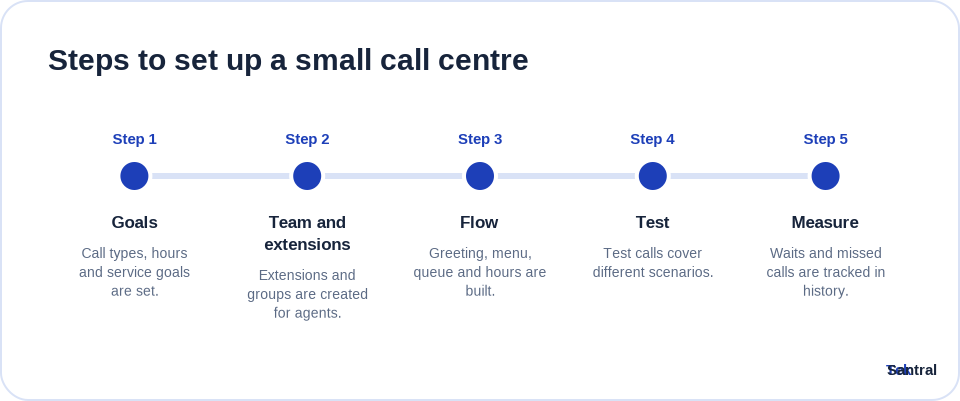
A successful call centre starts with goals, not technology. Decide in advance which call types will come in (sales, support, complaints, order tracking), the hours you serve, how long callers may reasonably wait and what happens after hours.
These decisions shape the PBX set-up. If speed matters for sales, define sales as a ring group; if order matters for support, make support a queue. Complaints can go to experienced agents through a separate option.
- List call types and their expected volume.
- Set service hours and holidays.
- Set the longest acceptable wait.
- Plan voicemail or on-call cover after hours.
- Prepare a notice if you will record calls.
Related pages: Call Recording and KVKK: A Business Guide
How do you build the call centre flow?
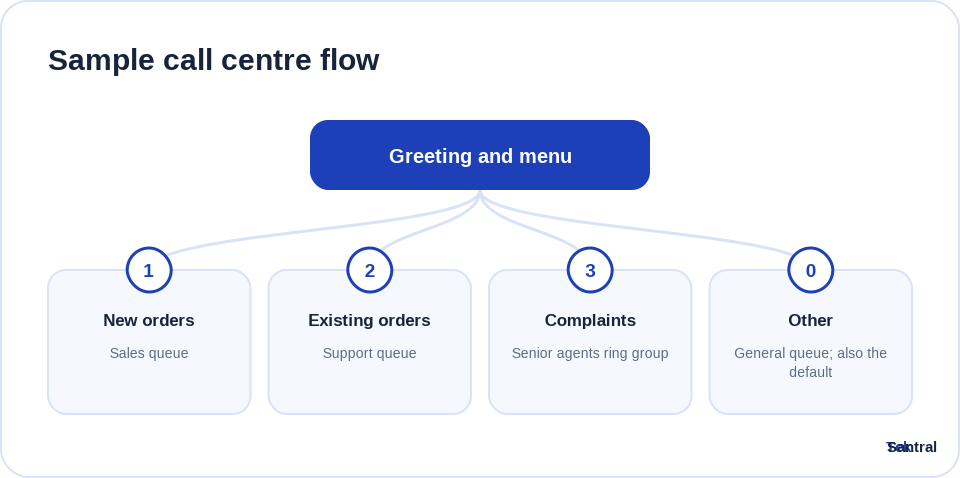
The heart of a call centre is the call flow. Callers hear a short greeting and, if needed, a recording notice; then pick their topic in a menu of up to four options. Each option leads to the right team’s queue or ring group. A general queue serves as the default for callers who press nothing.
Callers in a queue hear hold music, and when the maximum wait runs out the call goes to voicemail or another team. The business-hours plan sits in front of everything: after hours, a message with your opening times and voicemail replace the menu.
Related pages: How to Build an IVR Welcome MenuGreeting Message Examples and Writing Guide
How do you choose a queue strategy?
A queue lines up callers and hands them to free agents. The queue strategy sets how calls are distributed; choose it by team structure and how evenly you want workload spread.
| Strategy | How it works | When to use |
|---|---|---|
| Ring all | All free agents ring at once | Small teams, fast answers |
| In turn | Calls rotate through agents | Even workload |
| Fewest calls | The agent with fewest calls goes first | Fair distribution |
| Longest idle | The agent idle longest gets the call | Busy, balanced teams |
Related pages: Call Centre PBX: Queues, IVR and Recording10 Ways to Reduce Missed Calls
Where and how do agents work?
On a cloud PBX, an agent’s extension belongs to the person and works wherever there is internet. Agents can use a softphone and headset, the browser phone in the customer panel or a desk phone. That makes it possible to build a call centre with agents in different cities or part-timers working from home.
When sizing the team, consider your plan’s concurrent call capacity: Mini 1, Starter 3, Business 15, Enterprise 25, with extra lines available per channel. Callers waiting in a queue also count towards concurrent calls.
Related pages: Phone System for Remote TeamsCloud and Virtual PBX Pricing 2026: From TRY 440 a Month
Which indicators should a call centre track?
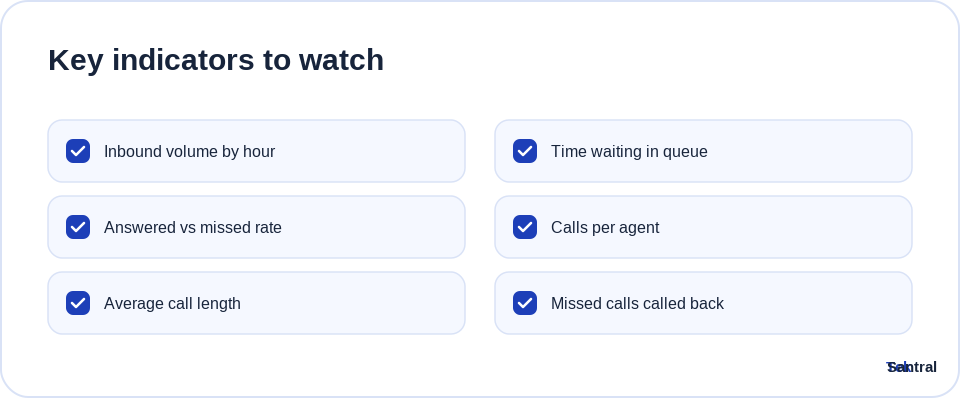
Once the centre is running, the real work is measuring and improving. Call history keeps each call’s time, length, direction and who answered. With it you see busy hours, how many calls are missed and how many each agent handles.
A weekly review fixes problems before they grow. If missed calls rise at lunchtime, change the break rota; if a menu option is rarely used, simplify the menu.
How many agents do you need?
The most practical way to size the team uses calls in the busiest hour and average call length. If 40 calls arrive in the busiest hour and calls last 3 minutes on average, that hour holds 120 minutes of talk. One agent can talk at most 60 minutes an hour, so in theory you need at least 2 agents; because calls do not arrive evenly, you need a margin on top in practice.
Remember agents also need time between calls for notes and system updates. A common approach is adding at least 30–50 percent on top of the theoretical need. In the first weeks, adjust the number using queue waits and missed calls in call history.
| Input | Value |
|---|---|
| Calls in the busiest hour | 40 |
| Average call length | 3 minutes |
| Total talk load | 120 minutes |
| Theoretical agents | 10 |
| Suggested with margin | 5 |
Agent training and call quality
However good the technology, the agent’s manner shapes the experience. A short opening line, using the customer’s name, repeating the issue to confirm and clarifying the next step at the end are small but powerful habits. A simple call guide helps new agents get up to speed quickly.
Call recordings are valuable for training. Listening to a few as a team each week, sharing good examples and spotting recurring issues keeps raising quality. If you record, inform callers in the greeting and limit who can access recordings.
- Standardise opening and closing lines.
- Prepare short answers to frequent questions.
- Hold weekly recording review sessions.
- Clarify transfer rules: which topic goes to whom?
Related pages: Call Recording and KVKK: A Business GuideGreeting Message Examples and Writing Guide
Planning for after hours and peaks
A call centre shapes customer experience after hours and at peaks too. With a business-hours plan, after-hours calls go to a message with your opening times and to voicemail; messages arrive by e-mail and are returned first thing. A holiday list makes sure holiday callers are informed correctly.
During campaigns or seasons, call volume can multiply. Giving temporary agents extensions, reviewing the queue’s maximum wait and, if needed, raising your plan’s concurrent capacity prevents missed calls. Closing temporary extensions afterwards takes minutes.
Related pages: After-Hours Message Examples and SetupCloud and Virtual PBX Pricing 2026: From TRY 440 a Month
Growing your call centre
As the centre grows, new needs appear: more numbers, separate queues for different topics, ring groups for team leads or agents in other cities. On a cloud PBX none of this needs new hardware or cabling; you create extensions and queues in the panel and upgrade the plan if needed.
Keep the call flow simple as you grow. Rather than adding a menu option for every new need, review the existing ones to protect the caller experience.
Starting small and growing by measurement is the healthiest path: build the core flow, watch the data, then expand as needed.
Common call centre mistakes
The commonest mistakes in small call centres are about planning, not technology. Reviewing this list before launch prevents complaints in the first weeks.
- Building long menus with many options.
- No maximum wait or fallback target for the queue.
- Not planning after hours and holidays.
- Not sizing concurrent calls for peak hours.
- Recording without informing callers.
- No process for calling back missed calls.
Related pages: 10 Ways to Reduce Missed Calls