PBX CRM integration: The customer calls. Their record is already open.
PBX CRM integration: the customer record opens on an incoming call, click-to-call runs from your CRM and outcomes and notes are saved. REST API and OAuth.
What is PBX CRM integration?
PBX CRM integration connects your phone system with your customer relationship management (CRM) software. The PBX tells the CRM when a call starts, is answered and ends, and the CRM can tell the PBX to call a number or add a note to a call. Agents stop copying numbers between screens, and every conversation appears on the right customer record.
TekSantral provides this connection through a public REST API, signed webhooks and OAuth 2.0. If your own team builds your CRM, it can connect directly with an API key; a ready-made CRM product can use the “Connect to TekSantral” flow to access its customers’ accounts with their permission.
Related pages: API Reference: CRM and Call Centre Integration
Ready-made connections for Bitrix24 and HubSpot
If you use Bitrix24 or HubSpot you do not need to write any code. Connect in a few steps from the CRM connections page of the customer panel; from then on calls flow into your CRM automatically.
Bitrix24
The customer card opens for the employees whose phones ring, clicking a number calls from their extension, every call becomes an activity with its recording, and unknown callers become leads.
HubSpot
Every call is logged on the caller’s contact with its duration, outcome, owner and a playable recording; unknown numbers become contacts and notes are copied too.
How does the customer record open on an incoming call?
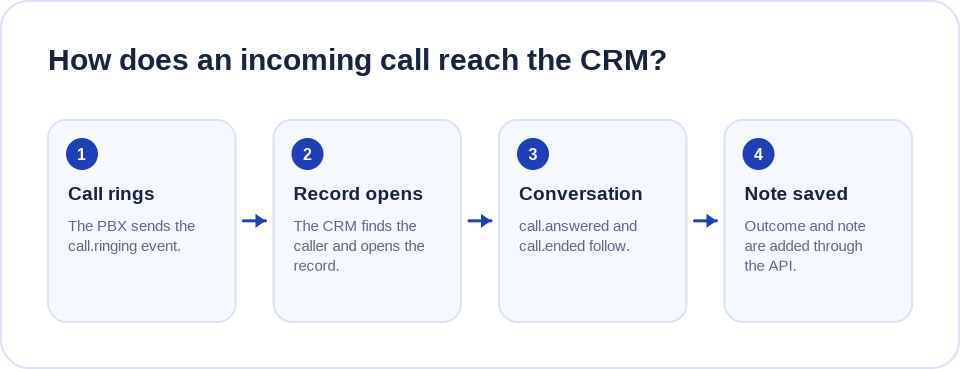
When an external call starts ringing an extension, TekSantral sends the call.ringing event to your CRM’s webhook address. The event carries the caller’s number, the business number that was called, the ringing extension, the queue and, if the caller is in the phonebook, the customer’s name, account owner and CRM record ID (external_id).
The CRM uses this to open the customer record on the right agent’s screen. When the agent answers, call.answered follows, and when the call finishes, call.ended arrives with the duration, recording status and queue details. Every event carries the same call ID (call_id), so the CRM can merge all steps of a call into one record.
Which events do the webhooks send?
These are the events most used in CRM integrations. All of them are sent as JSON with POST and delivered to the same destination in order.
Related pages: Queue Callback: Keep the Caller’s PlaceCall Centre Wallboard and Live Monitoring
| Event | When is it sent? |
|---|---|
| call.ringing | An incoming call is ringing an extension; used to open the customer record |
| call.answered | The extension answered the call |
| call.ended | An inbound, outbound or internal call ended; phonebook entry and notes included |
| call.updated | A call’s outcome code, tags or note changed |
| agent.status | An agent logged in or out, took a break or their phone connected |
| callback.updated | A callback was requested, the customer was called or the item was closed |
| voicemail.received | A voicemail was left |
How does click-to-call from the CRM work?
Click-to-call means starting a call through the PBX by clicking a phone number in the CRM. The CRM sends the agent’s extension and the number to dial to the TekSantral API. The PBX first rings only the agent’s own devices, and once the agent answers it calls the customer from your business number.
The call follows the extension’s calling permissions and recording setting, so international restrictions and call recording apply to click-to-call too. You can attach a reference to the request, such as the deal ID in your CRM; it comes back in every webhook event for the call and can be searched in the call history.
- The ring time can be set between 10 and 60 seconds.
- Optionally, one of your business numbers can be chosen as the caller ID.
- Up to 60 click-to-call requests can be sent per minute.
How are outcomes, tags and notes saved?
Three pieces of information can be added to every call through the API: an outcome code (up to 40 characters, such as “sale” or “information given”), up to 10 tags and a free-text note of up to 2,000 characters. Notes can be written while the call is still in progress. They appear in the call history and are kept for 400 days.
When a note changes, the call.updated event is sent, so the note written in the CRM and the record in the PBX stay the same. The customer panel shows the notes; they are written through the API.
Phonebook and routing to the account owner
The TekSantral phonebook holds up to 50,000 entries. Each entry can have a number, a name, an account owner (extension) and a CRM record ID (external_id). When a customer in the phonebook calls, their name is shown on the agent’s phone.
If “owner first” is enabled on a queue, the call goes to the account owner first when they are free and logged in (5–60 seconds, 15 by default). If they don’t answer, the call returns to the normal queue. Your CRM can update the phonebook in bulk through the API, so calls follow whoever the customer is assigned to.
Related pages: Call Centre PBX: Queues, IVR and Recording
What happens in the CRM, and which TekSantral tool does it?
The most common integration needs and how TekSantral covers them:
| In the CRM | In TekSantral |
|---|---|
| The customer record opens on an incoming call | call.ringing webhook |
| Clicking a number starts a call | POST /calls (click-to-call) |
| Outcome and note are saved | Call notes API and call.updated |
| The customer is assigned to an agent | Phonebook: account owner and external_id |
| The recording is played from the customer record | GET /calls/{id}/recording |
| A missed call becomes a task | call.ended and the callback list |
| Management reports | GET /reports/queues and /reports/agents |
Recordings, reports and live status through the API
Call history can be fetched and filtered by date, direction, status, extension and reference. Recordings are downloaded through the API; they are kept for 7 days within a 250 MB limit, and a single recording can be deleted through the API.
Queue reports can be fetched for up to 93 days in hourly or daily intervals, and agent reports for up to 31 days. Live agent status, waiting callers and calls in progress can also be read through the API, so your CRM can build its own dashboard.
Related pages: Call Recording: Record and Replay CallsCall Centre Wallboard and Live Monitoring
OAuth 2.0 for ready-made CRM products
If you build CRM or call centre software for many customers, you don’t need to ask each of them for an API key. Once your app is registered with TekSantral, customers sign in to their panel with a “Connect to TekSantral” button and grant permission.
The flow is the standard authorisation code flow protected with PKCE. Access tokens are valid for 1 hour and refresh tokens for 90 days. Customers can remove the connection at any time under Connected apps in their panel.
Is the integration secure?
Because PBX data contains customer information, the integration layer has these safeguards:
Scoped keys
Each key works only with the scopes you choose: read, call, manage or dialer. An account can have up to 5 active keys.
IP restriction
A key can be limited to a single address or address range.
Signed webhooks
Every event is signed with HMAC-SHA256; the receiver checks the signature and timestamp and rejects forged requests.
Reliable retries
An event that cannot be delivered is tried 7 times in all, at intervals of up to 6 hours, and can be resent from the event history.
How do you set up the CRM integration step by step?
For a business with its own development team, a typical setup looks like this:
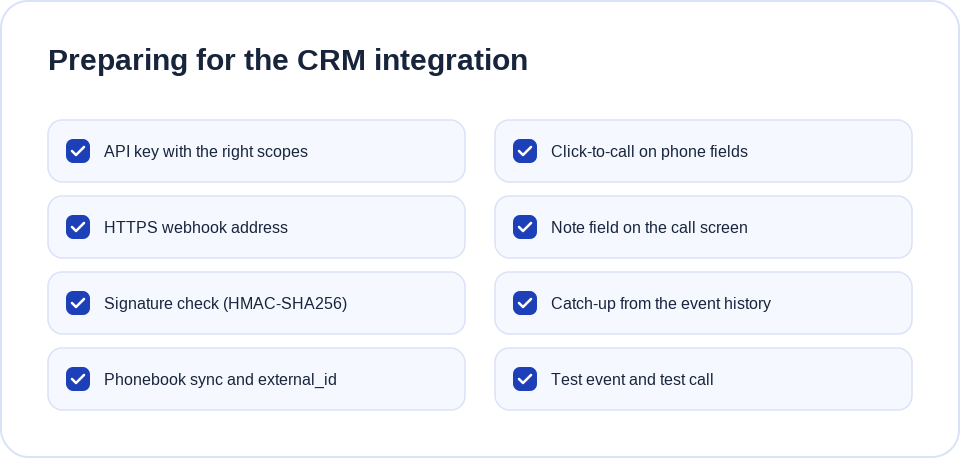
- Create a key with the scopes you need on the API and integrations page of the customer panel.
- Build the webhook receiver in your CRM and add signature verification.
- Save the webhook address in the panel or through the API and send a test event.
- Sync the phonebook with your CRM customers, including external_id and the account owner.
- Add click-to-call links to phone fields and a note field to the call screen.
- After an outage, fetch missed events in order from the event history.
Related pages: API Reference: CRM and Call Centre IntegrationSIP, IP Phone and Software Integrations
Which CRMs does TekSantral work with?+
There are ready-made connections for Bitrix24 and HubSpot, set up from the panel without code. Any other CRM that can receive webhooks and send HTTP requests connects through the public REST API and signed webhooks.
Is there an extra charge for the API?+
Yes; the REST API, webhooks, OAuth 2.0 and the ready Bitrix24 and HubSpot connections come with the CRM, e-commerce and REST API module: from TRY 199 (Mini) to TRY 479 (Enterprise) a month depending on the plan, 10% off paid yearly (VAT included). Plans start at TRY 489 a month.
Can the customer record open before the call is answered?+
Yes. The call.ringing event is sent as soon as the phone starts ringing, so the CRM can open the record before the agent answers.
Which number does the customer see with click-to-call?+
The customer sees the extension’s outgoing caller ID. You can also choose one of your business numbers as the caller ID in the request.
Can call notes be written in the panel?+
Notes, outcome codes and tags are written through the API and shown in the call history of the customer panel.
Are events lost if my webhook address is down?+
No. An event is tried 7 times in all, at intervals growing from 30 seconds to 6 hours. Missed events can be fetched in order from the event history or resent.
Can I send events to more than one system?+
Yes. In addition to your account’s webhook, every app connected through OAuth sets its own webhook address and sees only its own events.
Can I set up the integration without developers?+
For Bitrix24 and HubSpot, yes: the ready-made connection is set up from the panel in a few steps. Other CRMs need software development for the API integration; you can discuss your needs with our team.