
What is a missed call and why does it matter?
A missed call is a call to your business that nobody answers and no voicemail catches. Every missed call is a potential sale, appointment or customer problem waiting to be solved; callers often try another business instead of calling again.
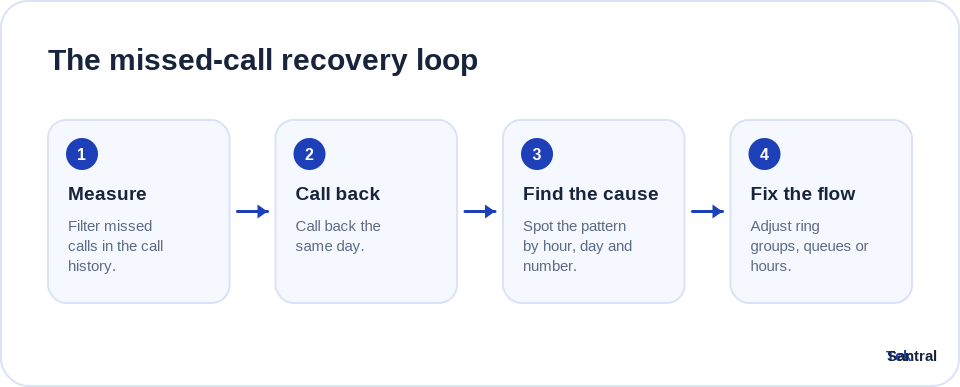
The first step is making missed calls visible. A cloud PBX’s call history shows which numbers and hours leave calls unanswered. Once the cause is clear, the fix is usually a simple PBX setting: ring more people, organise waiting or plan after-hours.
Related pages: Call Centre PBX: Queues, IVR and Recording
Why are calls missed?
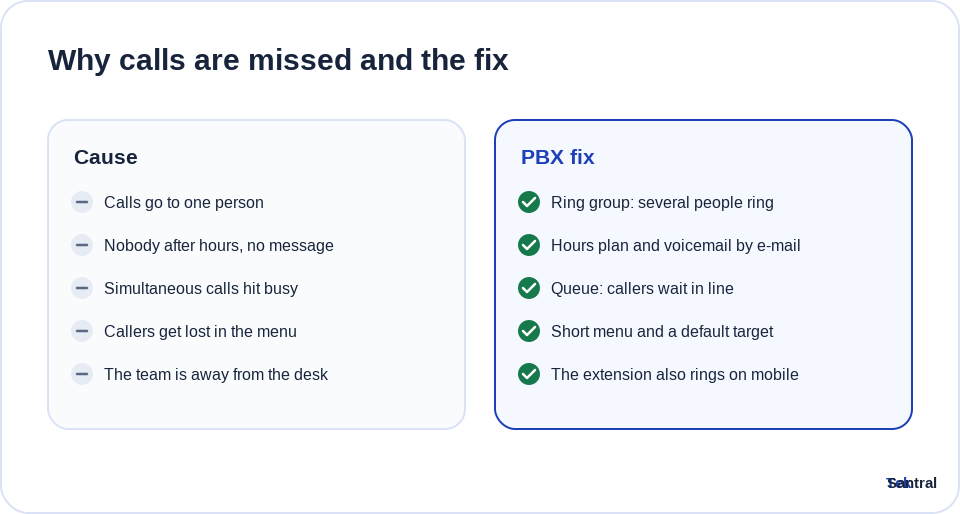
Most missed calls come from a few recurring causes. If calls go to one person, they go unanswered whenever that person is on the phone or away. One of two simultaneous calls may hit a busy tone. After-hours callers may hear a phone ringing out with no message.
Complex menus are another cause: more than four or five options, long announcements or no target for callers who press nothing make people hang up.
The 10 ways, step by step
Most of these take minutes to set up on a cloud PBX. Rather than doing everything at once, start with the problem that shows up most in your call history.
1. Use ring groups
Ring several people at once; whoever answers first takes the call.
2. Set up a queue
At busy times callers wait in line with hold music instead of hearing busy.
3. Define business hours
After hours, play a short message and take voicemail.
4. Send voicemail to e-mail
Messages arrive as audio files so you can call back first thing.
5. Shorten the menu
Use at most four options and a default target if nothing is pressed.
6. Add mobiles
Let the extension ring on a mobile app as well as the desk phone.
7. Redirect unanswered calls
If unanswered for a while, send the call to a second group, a mobile or voicemail.
8. Plan holidays
Inform holiday callers with a special message.
9. Check missed calls daily
Filter missed calls in the history and call back the same day.
10. Size capacity correctly
If you often hit the concurrent call limit, upgrade your plan.
Related pages: How to Build an IVR Welcome MenuAfter-Hours Message Examples and Setup
Ring group or queue?
Ring groups and queues are the two main tools against missed calls, but they suit different situations. Ring groups are ideal for small teams and sales lines that expect fast answers; queues hold callers without losing them on support and service lines where calls outnumber agents.
| Feature | Ring group | Queue |
|---|---|---|
| How it works | Members ring together or in turn | Callers queue and reach the next free agent |
| Best for | Small teams, sales lines | Support, customer service |
| When busy | If all are busy, a fallback rule applies | Callers wait with hold music |
| Wait limit | Ring time is set | Maximum wait is set |
Related pages: Call Centre PBX: Queues, IVR and RecordingCloud PBX for Sales Teams: Queues, Call-backs
How do you avoid losing after-hours calls?
After-hours calls are the opportunities businesses miss most. A short message giving your opening hours, followed by the option to leave voicemail, keeps the call from being lost. With messages arriving as audio files by e-mail, you can call back first thing next morning.
For emergencies, the after-hours flow can forward to an on-call mobile. A service company could offer “press 1 for urgent faults” and transfer the call to the on-call technician.
Related pages: After-Hours Message Examples and SetupGreeting Message Examples and Writing Guide
How should you call back a missed call?
You cannot always avoid missed calls; what matters is how fast and how well you call back. A call-back the same day, ideally within hours, reaches the customer before they try a competitor. Naming who makes call-backs stops calls being forgotten because “someone will ring them”.
Calling back from the business number builds trust. On a cloud PBX, your business number shows on outgoing calls whatever device your extension is on, and customers tend to answer a number they recognise. Opening with “You called us a moment ago and we missed you” tells them at once why you are calling.
Where a voicemail was left, listen first and call back prepared; it shortens the call and shows you care. Messages arrive by e-mail as audio files, so they are easy to forward to the right person.
- Check the missed-call list at set times each day.
- Name who calls back for each team.
- Listen to voicemail and call back prepared.
- Try unreachable customers again at a different time.
Missed-call risks by sector
The cost of a missed call differs by sector. In some businesses it means a lost sale; in others it hurts satisfaction. Where the risk is highest, ring groups and queues matter even more.
| Sector | Impact of a missed call | Suggested fix |
|---|---|---|
| Clinics and health | The booking goes elsewhere | Ring group for bookings, after-hours voicemail |
| Real estate | A buyer or tenant is lost | Ring agents’ mobile apps |
| E-commerce | Cancelled orders and bad reviews | Support queue and an orders option |
| Service centre | The job goes to a competitor | On-call routing for urgent faults |
| Restaurant | A takeaway order is lost | Queue at peak times |
Related pages: Cloud PBX for Clinics and PracticesCloud PBX for E-commerce: Orders and ReturnsCloud PBX Solutions by IndustryCloud PBX for RestaurantsCloud PBX for Real Estate AgenciesCloud PBX for Logistics Companies
How do you plan capacity for peak hours?
Many missed calls come from team capacity falling below call volume at peak times. Looking at inbound calls by hour in call history usually shows clear peaks: opening time, after lunch and near the end of the day. Rearranging breaks and temporarily adding people to the ring group at those times can cut missed calls without hiring.
On the PBX side, the concurrent call limit is also part of capacity. If peak hours hit your plan’s limit, new calls are refused and callers hear busy. Then move up a plan or adjust the queue’s maximum wait.
Related pages: Cloud and Virtual PBX Pricing 2026: From TRY 440 a MonthSetting Up a Call Centre for Small Teams
A missed-call plan for your first week
Cutting missed calls needs no big project. On day one, filter the last two weeks of missed calls and note which hours and numbers stand out. On day two, turn single-person routing into ring groups and add mobile apps to extensions. On day three, set business hours and an after-hours message, and test that voicemail reaches your inbox.
For the rest of the week, check the missed-call list daily and call back the same day. At the end, compare results with day one; most businesses see a clear drop from these simple steps and know which further measures they need.
Cutting missed calls is a habit, not a one-off job. A short weekly review spots seasonal peaks and team changes in time. Businesses that watch their call history regularly soon see that being reachable is a service quality that sets them apart.
How do you measure missed calls?
You cannot improve what you do not measure. TekSantral’s call history lists inbound, outbound and internal calls, who answered, duration and unanswered calls. Date, direction and status filters find, for example, “inbound calls missed in business hours this week” in a few clicks. The overview screen shows today’s missed calls directly.
Each week, check when missed calls cluster. Lunch breaks, opening time and campaign days usually stand out. Adding people to the ring group or turning on a queue at those times often solves it.