
Is recording calls against KVKK?
Recording calls is not forbidden in itself, but because a voice recording and a phone number are personal data, the obligations of Law No. 6698 on the Protection of Personal Data (KVKK) apply. The basic rules: inform callers, keep the data for a defined purpose and only as long as needed, and protect it from unauthorised access.
This article is general information and not legal advice. Whether explicit consent is needed for your sector and purpose, what your privacy notice should say and obligations such as VERBİS registration are best reviewed with a legal adviser.
The checklist below walks through what a business that records calls needs to cover, from the notice and retention to access control and data requests.
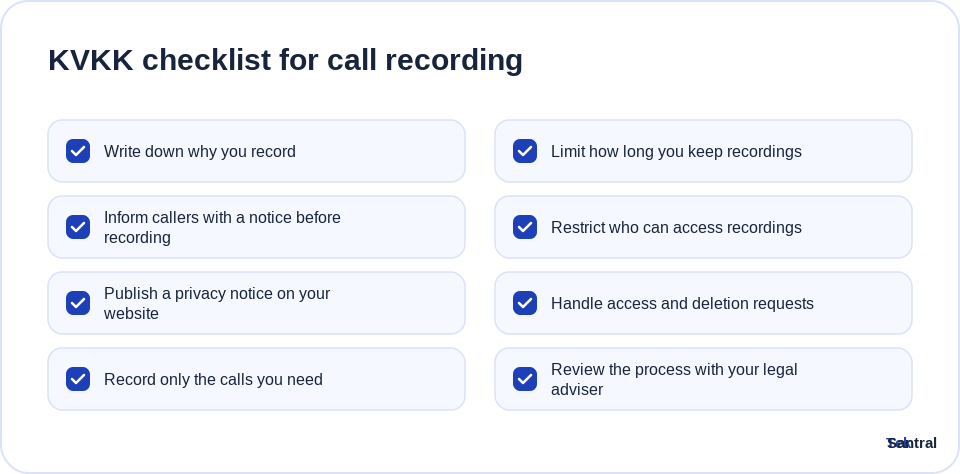
Which businesses record calls?
Recording is used most in call centres, sales teams, order and booking lines and complaint handling. The aim is usually to measure service quality, train new staff, confirm orders given by phone and settle disputes about what was said.
Writing down your purpose matters, because it decides how long you keep recordings and who may access them. A concrete decision such as “one week of recordings is enough for quality checks” keeps you from storing more than you need.
When defining the purpose, involve your staff too: a team that knows why calls are recorded is more careful to inform customers and to handle recordings properly.
Related pages: Cloud PBX for Law Firms
1. Inform the caller
Before recording, tell the caller in a short message that the call is recorded and why. Example: “Calls are recorded to improve our service. See the privacy notice on our website for details.”
In TekSantral you can put this notice at the start of your greeting or add a short announcement before your number’s menu. If you record outgoing calls, telling the other party at the start of the call is good practice.
Related pages: How to Build an IVR Welcome Menu
Sample recording notices
Pick the one that fits your business and put it at the start of your greeting recording:
Short
“Calls are recorded to improve the quality of our service.”
Detailed
“Calls are recorded to improve our service and to follow up your requests. Our privacy notice on how we process personal data is on our website.”
Order line
“Your call is recorded so that your order is processed correctly.”
2. Decide what to record
You do not have to record every call. In TekSantral you switch recording on or off separately for inbound, outbound and internal calls, and can set “always record” or “never record” for specific extensions.
For example, you can record inbound calls for sales and support while leaving the manager’s extension and internal calls unrecorded. Fewer recordings mean less risk and easier management.
| Call type | Recorded | Reason |
|---|---|---|
| Inbound customer calls | Yes | Service quality and follow-up |
| Sales team outbound calls | Yes | Confirming orders given by phone |
| Internal calls | No | No specific purpose |
| Manager extension | No | Confidential business calls |
3. Limit retention
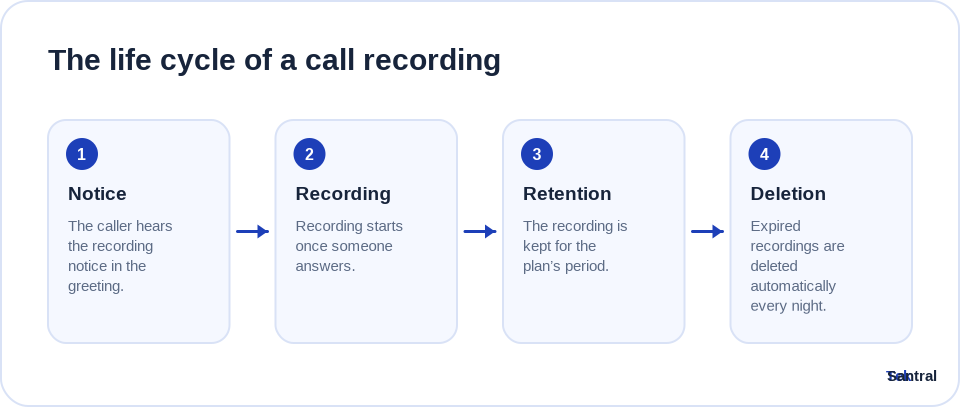
Keep recordings only as long as the purpose requires. TekSantral keeps recordings for your plan’s retention period and deletes expired ones automatically every night; download any you must keep longer into your own secure archive.
All TekSantral plans include 7 days and 250 MB of recording storage. This is enough for most quality checks and order confirmations. If you need longer retention, write the reason into your recording policy.
4. Restrict access
Decide who may listen to recordings and do not share your panel password. Protect the panel account with a strong password, and change it when an employee with access leaves.
Do not circulate downloaded recordings in shared folders or email attachments; keep them in an archive with restricted access. In TekSantral each customer’s recordings are reachable only from their own panel; no other customer can see yours.
5. Handle requests
If someone asks about recordings that concern them, you need to find them. Search the call history by date and number, then play or download the recordings. If a recording must be deleted before its retention ends, contact our support team.
KVKK expects requests from data subjects to be answered within a reasonable time. Deciding in advance who handles requests and how lets you respond quickly when one arrives.
Related pages: Privacy Policy and Personal Data NoticeSupport and Setup Guides
What should the privacy notice include?
Because the recording notice is short, the details belong in the privacy notice on your website. It should explain in plain language why and how callers’ data is processed. It is best prepared with a legal adviser for your business; it usually covers:
- Who the data controller is and how to contact them
- Why calls are recorded
- Who recordings may be shared with and why
- How long recordings are kept
- The data subject’s rights and how to apply
Outgoing calls and sales calls
On incoming calls the notice plays automatically; on outgoing calls informing the other party is the agent’s job. Saying “This call is recorded for quality purposes” at the start is simple and effective. For sales teams, putting this sentence on the first line of the call script keeps it from being forgotten.
If you use recordings for training, keep the ones played in training to a minimum and delete shared copies afterwards. Not using recordings beyond their purpose matters for both customer trust and compliance.
How do you get value from recordings?
Recordings are more than an archive for disputes. Listening to a few calls a week with team leads reveals frequent questions and unmet requests, which can improve the welcome menu, the website FAQ and training material.
Common mistakes with call recording
Avoiding these reduces risk:
Recording everything
Recordings without a purpose only add risk and storage load.
Forgetting the notice
If recording is on but the notice is missing, callers are not informed.
Emailing recordings
Attachments create uncontrolled copies; share from a restricted location.
Sharing the password
A panel password known to many makes access untraceable.
Put your recording policy in writing
A short recording policy puts on one page which calls are recorded and why, how long recordings are kept, who can access them and how requests are handled. It helps new staff understand the process and shows care in any audit.
How are recordings kept secure?
In TekSantral each customer’s PBX runs on its own configuration and recordings are stored in areas separated per customer. Communication between the panel and the PBX server is encrypted, and recordings are served only to the signed-in account owner from their own panel. Expired recordings are deleted automatically every night.
On your side, the key is the panel account: use a strong, unique password, do not pass it around the team and keep the computers you download recordings to secure. Keeping the number of people who can listen to a minimum also limits the impact of any leak.
Where should the notice go in the menu?
The recording notice must be heard before recording starts. In TekSantral recording begins once someone answers, so putting the notice at the start of the greeting or in a short announcement before the menu is enough. For numbers without a menu that go straight to a team, add a short announcement in front of the destination. Recording the notice once and using it on all numbers keeps the wording identical everywhere.
How do you turn on recording in TekSantral?
You can set up recording in minutes:
- In General settings, choose inbound, outbound and internal recording separately.
- If needed, set “always” or “never” on an extension.
- Add the recording notice to your greeting.
- Listen to or download recordings from the call history.
Related pages: Call Centre PBX: Queues, IVR and Recording