Call centre PBX: A place for every call. Attention for every customer.
What is a call centre phone system and how do you set one up? Run customer service in the cloud with queues, callbacks, a live wallboard, recording and reports.
What is a call centre PBX?
A call centre PBX queues incoming calls, distributes them to agents, records them and reports on them. Once built with separate software in large companies, it is now within reach of small and mid-sized teams through the queues, IVR, recording and call history of a cloud PBX.
At TekSantral every plan has queues. Agents can be in the office, at home or in other cities; they join the same queue and serve from the same business number.
Related pages: What Is a Cloud PBX? How It Works, Pricing
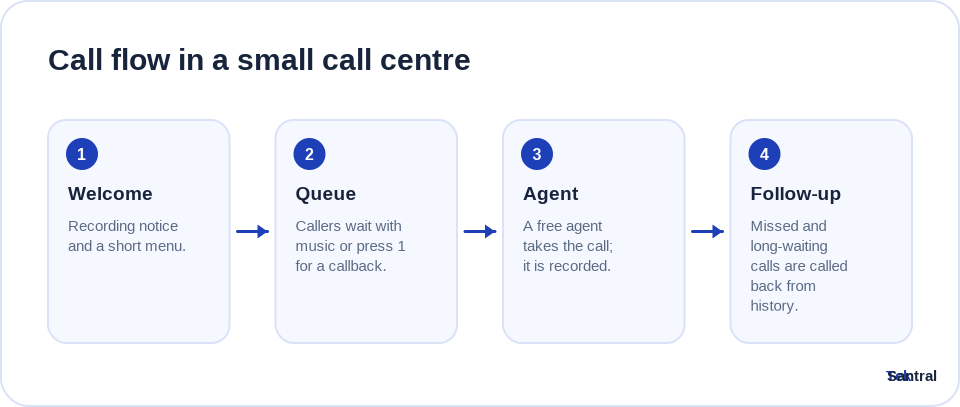
How do you set up a small call centre?
Even for a team of a few people, these steps are enough:
- Connect your business number (0850 or a city number) to the PBX.
- Create an extension per agent; a softphone with a headset is recommended.
- Create a queue, add agents, and choose the wait time and exit destination.
- Add a recording notice to the welcome and turn on inbound recording.
- Set an after-hours message and voicemail.
- Check missed calls in call history daily and call back.
Related pages: Call Recording and KVKK: A Business GuideChoosing IP Phones and Softphones
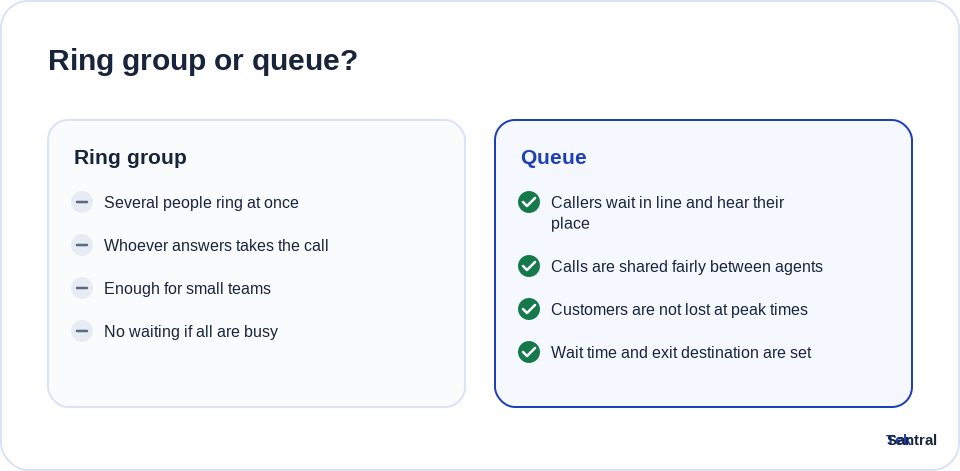
Should I use a ring group or a queue?
A ring group rings several phones at once or in turn; if all are busy the call goes to voicemail or another destination. A queue holds callers in line with music and announcements and connects them to the first free agent; callers can press 1 to keep their place and ask for a callback. A ring group is enough for teams with a few calls a day; on lines where several calls arrive together, a queue prevents losing customers.
Which features matter in a call centre PBX?
The table shows the core needs and how TekSantral covers them:
Related pages: Virtual PBX Features: The Complete List
| Need | In TekSantral |
|---|---|
| Holding callers in line | Queue, hold music, periodic announcements and callbacks |
| Routing to the right team | IVR with nested menus |
| Quality and training | Inbound/outbound recording with per-person exceptions |
| Real-time view | Live wallboard: waiting callers, agent states and today’s service level |
| Call-backs | Callback list and the missed-call filter in call history |
| Remote work | Softphone, mobile app and browser phone |
| Capacity | 1, 3, 15 or 25 concurrent calls by plan; more with extra lines |
| Agent management | *45 log in, *46 log out, *47 break, *48 back from break |
| Reports | Queue and agent reports: answered, abandoned, service level, talk time |
| Software integration | REST API, signed webhooks and click-to-call |
How do you improve call centre performance?
Habits matter as much as technology. What makes a difference in small teams:
Related pages: Cloud PBX for Sales Teams: Queues, Call-backsCloud PBX for E-commerce: Orders and Returns
A short greeting
Limit the menu to three or four options; put the most requested team first.
A realistic wait time
Keep the wait realistic: let callers press 1 for a callback, and send them to voicemail when the time runs out.
Training with recordings
Listen to sample calls together; recordings are kept for 7 days.
Daily call-backs
Clear the missed-call list in call history by the end of each day.
How do you manage a remote call centre team?
A cloud PBX does not need agents in one place. A home-based agent joins the queue with a computer softphone or the browser phone and takes the same calls as office colleagues. What a manager needs is to see who is online and which calls are waiting.
The live status screen shows online extensions and active calls; call history shows missed calls and who answered what at the end of the day. Recordings can be reviewed together for training and quality.
Related pages: Managing Your PBX from Your Phone
Which devices and headsets suit a call centre?
For agents on the phone all day, ergonomics and audio quality directly affect productivity:
- A softphone or browser phone with a USB headset, keeping hands free.
- A headset with a noise-cancelling microphone for noisy rooms.
- A wired network connection or a strong Wi-Fi signal.
- SIP ALG switched off in the office router settings.
Related pages: Mobile PBX App: TekSantral Mobile
How do agents join a queue and take breaks?
In queues that require log-in, agents dial *45 from their phone at the start of a shift and *46 when they leave. *47 starts a break and *48 ends it. Break reasons appear separately in reports, so managers know how long each person was ready to take calls.
Calls can be shared among agents in six ways: ring all, longest idle, fewest calls, round robin with memory, fixed order and random. If you assign an agent to a customer in the phonebook, that customer’s calls ring their own agent first; if the agent is not free, the call returns to the queue.
Why do callbacks and a live wallboard matter?
Callers who wait too long usually hang up and do not call again. With queue callback the caller presses 1 and hangs up; their place is kept, and when their turn comes the system calls them automatically. Callers who hang up or time out can also go to the callback list.
The live wallboard shows managers, on one screen, how many callers are waiting, the longest wait, each agent’s state and the day’s service level. It can be shown on an office TV through a secret link that needs no log-in, and alerts go out when a threshold is crossed.
Related pages: Queue Callback: Keep the Caller’s PlaceCall Centre Wallboard and Live Monitoring
Call centre reports and CRM connection
The panel shows queue and agent reports for today, yesterday, the last 7 days and the last 30 days. The queue report covers offered, answered, abandoned, timed-out and callback calls, average wait, the 20-second service level and average talk time. The agent report covers answered and missed calls, talk time, logged-in time and breaks. The same data can flow into your CRM or reporting tool through the REST API.
Related pages: Call Centre Metrics: 10 Core KPIs and FormulasPBX CRM Integration: API and Click-to-Call
Call recording and privacy in a call centre
Call recording is a core call centre tool for training, quality control and resolving disputes. Callers must be informed before recording; the simplest way is a short notice at the start of the greeting. A detailed privacy notice should be on your website.
At TekSantral recording is switched on separately for inbound, outbound and internal calls, with “always” or “never” exceptions per person. Recordings are kept for the plan period and played only by people with account access.
Related pages: Call Recording and KVKK: A Business Guide
How many agents and which plan does a call centre need?
A practical way to size your team is to look at how many calls arrive at once in the busiest hour. Check call history for peak hours and compare concurrent calls with agents. If calls outnumber agents, queue waits get longer.
Starter with 3 concurrent calls suits small support lines, Business with 15 suits growing customer service, and Enterprise with 25 suits busy lines. When you need more channels, add extra lines per channel.
What does a call centre PBX cost?
Queues, recording and reports are in every plan; choose by number of agents and concurrent calls. Business suits up to 15 concurrent calls and Enterprise up to 25; add extra lines for more. The wallboard, SLA alerts and the auto dialer come with the call centre pack (TRY 249–599 a month depending on the plan).
Related pages: Cloud and Virtual PBX Pricing 2026: From TRY 440 a Month
| Plan | Monthly fee | Extension | Concurrent calls | Number | Provider trunks |
|---|---|---|---|---|---|
| Mini | TRY 489 | 25 | 444 | 444 | 444 |
| Starter | TRY 599 | 1 | 5 | 10 | 10 |
| Business | TRY 789 | 25 | 1 | 25 | 5 |
| Enterprise | TRY 1,199 | 50 | 15 | 1 | 25 |
Can agents work from home?+
Yes. Agents join the same queue with a softphone, mobile app or browser phone.
Can callers ask for a callback instead of waiting?+
Yes. The caller presses 1 and hangs up; their place is kept, and when their turn comes the system calls them back automatically.
Who can listen to recordings?+
Recordings are played from call history by people with access to the account. You must inform callers before recording.
How many agents can connect?+
By plan you get 5, 10, 25 or 50 extensions with 1, 3, 15 or 25 concurrent calls, and you can add extra lines.
Are calls lost while waiting?+
No. When the wait ends the call moves to the destination you set, and callers who hang up or time out can be added to the callback list.
What happens after hours?+
The schedule automatically sends calls to an after-hours message and voicemail.
Can callers hear music while waiting?+
Yes. Upload your own hold music or use the standard one.
Can an agent be in several queues?+
Yes. One extension can belong to both the sales and support queues.
Can managers watch queues live?+
Yes. The live wallboard shows waiting callers, the longest wait, agent states and the day’s service level, and sends alerts when a threshold is crossed.