Cloud PBX for multi-site businesses: Different locations. Shared communication.
Bring your branches together on one cloud PBX: an IVR with branch choice, branch numbers and hours, free calls between branches and central management.
What is a cloud PBX for multi-site businesses?
A cloud PBX for multi-site businesses joins branches and offices at different addresses on one PBX, with free internal calls between them and one shared welcome. No separate PBX is needed at each branch.
Head office, shops, warehouse and field team share one extension plan. A branch dials another by its short extension, while customers call one business number and are routed to the nearest or relevant branch.
Related pages: What Is a Cloud PBX? How It Works, PricingBusiness Numbers: 0850, 0212, 0216, 444
How do branches work on one PBX?
Giving each branch an extension range keeps things tidy, for example head office 101–119, Ankara branch 201–219, warehouse 301–309. Staff ring in their branch’s ring group; when a branch is closed, calls move to another branch or head office by schedule.
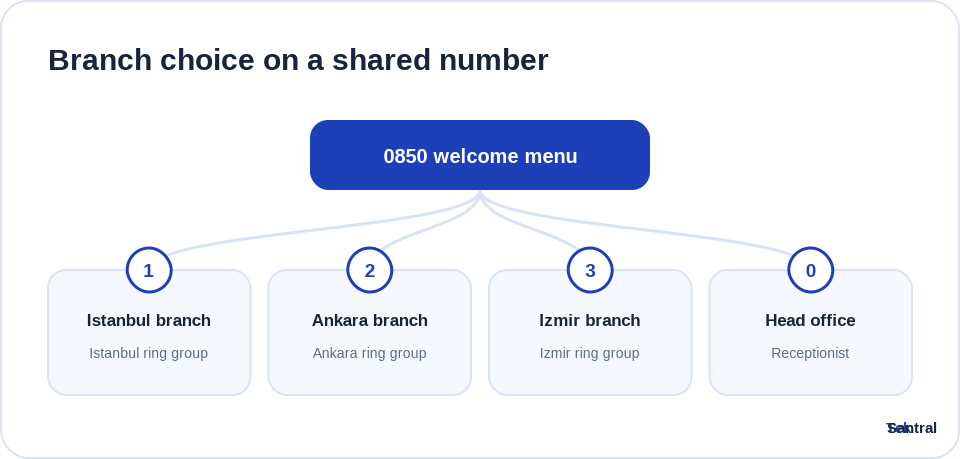
If branches have their own city numbers, each goes to that branch’s greeting; a shared 0850 number can lead to a menu where customers choose a branch.
How do on-premise and cloud PBXs differ across branches?
With a separate PBX per branch, maintenance, settings and transfers between branches are managed one by one. On a cloud PBX every branch is managed from one panel and opening a branch is as easy as adding extensions.
| Topic | PBX per branch | Shared cloud PBX |
|---|---|---|
| Setup | Hardware and a technician per branch | No hardware, from the panel |
| Calls between branches | Over external lines | By short extension |
| Shared welcome | Hard | Branch choice in one menu |
| A new branch | A new PBX | New extensions and a ring group |
| Administration | Branch by branch | One panel |
Where do calls go when a branch is closed?
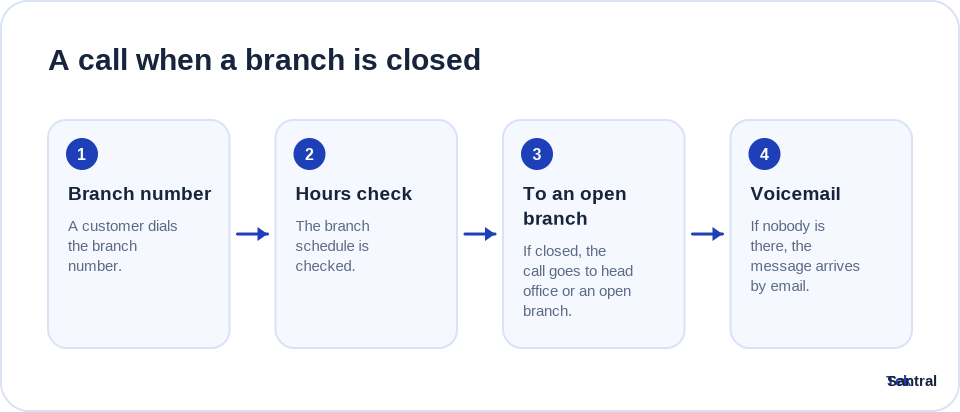
Branches may keep different hours. Schedules are defined per branch: when one closes, calls go to an open branch, head office or that branch’s voicemail. On public holidays, one holiday plan can apply to all branches.
Common mistakes in multi-site businesses
As branches grow, phone setups scatter; each branch improvises and head office loses sight.
A separate system per branch
Separate systems make transfers hard and raise costs.
No extension plan
An extension range per branch makes it easy to know whom to call.
Calls to closed branches
Without a branch schedule customers hear an unanswered ring.
Head office seeing nothing
One panel with every branch’s call history lets you measure service quality.
Which plan suits multi-site businesses?
Extensions and numbers grow with the number of branches. The Enterprise plan with 50 extensions, 25 concurrent calls and 10 numbers is designed for businesses with several branches.
Every plan includes 250 MB and 7 days of call recording. Calling and number allocation fees are separate from the PBX plan; if you have no number, we allocate one in your name from licensed fixed-line operators as an authorised reseller.
Related pages: Cloud and Virtual PBX Pricing 2026: From TRY 440 a Month
| Plan | Price | Extensions / concurrent calls / numbers | Who it suits |
|---|---|---|---|
| Starter | TRY 599 | 10 / 3 / 2 | Two small branches |
| Business | TRY 789 | 25 / 10 / 5 | 3–5 branches, a few extensions each |
| Enterprise | TRY 1,199 | 50 / 15 / 10 | Many branches with a shared contact centre |
Are calls between branches charged?+
No. Calls between extensions on the same PBX do not go to a provider and are not charged.
Can each branch have its own number?+
Yes. Within your plan’s number capacity, each branch can have its own number and greeting.
What do I do when opening a new branch?+
Create the extensions, add them to a ring group and add a menu key. No PBX hardware is installed at the branch.
Can calls be transferred between branches?+
Yes. Staff transfer the call to an extension at the other branch; the customer does not have to call again.
What if branches keep different hours?+
Each branch gets its own schedule; calls to a closed branch go to an open one or head office.
Is branch internet good enough?+
Voice needs little bandwidth per person. A stable connection and SIP ALG turned off on the router matter most for audio quality.