Cloud PBX for clinics: The right welcome, from the first call.
A cloud PBX for clinics and practices: an appointment line, after-hours message, on-call forwarding and controlled access to recordings.
What is a cloud PBX for clinics?
A cloud PBX for clinics handles appointments, results and information requests on separate paths, informs patients properly out of hours and lets receptionists work from anywhere. The PBX makes no medical assessment; it organises your team’s communication.
Whether a private practice, dental clinic, physiotherapy centre or polyclinic, reaching the right person on the first call builds trust. Organised calls ease the front desk and win back missed appointment requests.
Related pages: Call Recording and KVKK: A Business Guide
Sample call flow for a clinic
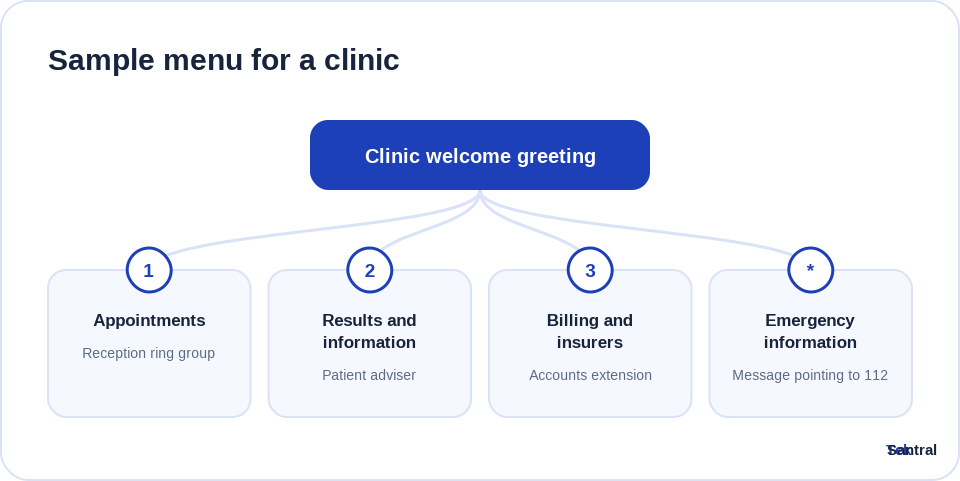
Appointment requests are the most frequent, so they get the first key and go to the reception ring group. Results and general questions get another key, and a message pointing emergencies to 112 is recommended. The PBX does not assess emergencies; it only informs the caller.
How are patients informed after hours?
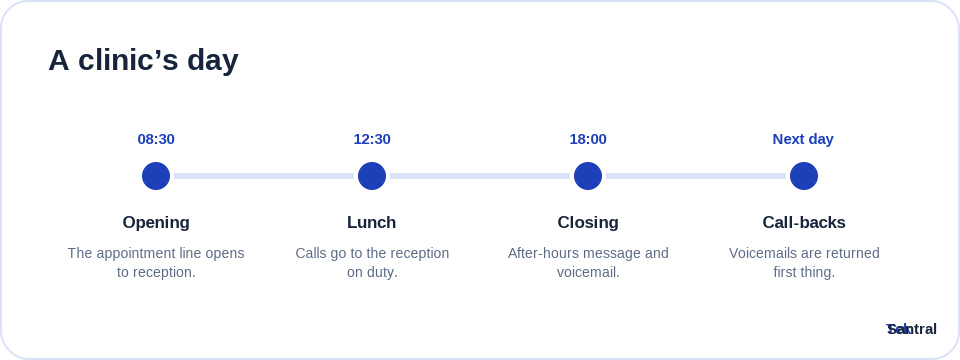
After hours, patients should hear a short message with opening hours, a reminder to call 112 in an emergency and the option to leave a voicemail. Messages arrive by email as audio files to be returned in the first working hour.
Clinics with an on-call doctor or staff member can forward after-hours calls to that person’s mobile, defined by day and time in the schedule.
Call recording and patient privacy
Health data is special-category personal data, so recording decisions need care. Many clinics record only the appointment line or not at all. In TekSantral recording is switched separately for inbound, outbound and internal calls, and “never record” can be chosen per extension.
If you record, inform patients with a message, keep access to recordings limited and set a retention period. Seek your own advice for your legal obligations.
Related pages: Call Recording and KVKK: A Business Guide
| Line | Recording suggestion | Reason |
|---|---|---|
| Appointment line | Optional, with notice | Confirming appointment details |
| Results and information | Usually off | May contain health data |
| Doctor extensions | Never | Privacy |
| Billing | Optional | Payment agreements |
Common phone mistakes in clinics
At a clinic the phone is often reception’s busiest task. These mistakes affect both patient satisfaction and appointment bookings.
Phones ringing over lunch
Without a lunch break in the schedule, calls ring out. Route them to a duty person or voicemail.
No emergency information
Tell after-hours callers to dial 112 in an emergency.
Recording every line
Consider switching recording off where calls may include health data.
Sharing doctors’ personal numbers
Doctors’ extensions ring in a mobile app; personal numbers stay private.
Which plan suits a clinic?
The Starter plan usually suits single-doctor practices. Clinics with several departments and a reception team prefer Business; polyclinics with branches choose Enterprise.
Every plan includes 250 MB and 7 days of call recording. Calling and number allocation fees are separate from the PBX plan; if you have no number, we allocate one in your name from licensed fixed-line operators as an authorised reseller.
Related pages: Cloud and Virtual PBX Pricing 2026: From TRY 440 a Month
| Plan | Price | Extensions / concurrent calls / numbers | Who it suits |
|---|---|---|---|
| Mini | TRY 489 | 5 / 1 / 1 | Small practice on a single line |
| Starter | TRY 599 | 10 / 3 / 2 | Private practice, one doctor |
| Business | TRY 789 | 25 / 10 / 5 | Multi-department clinic with reception |
| Enterprise | TRY 1,199 | 50 / 15 / 10 | Polyclinic with branches |
Does the PBX give medical guidance?+
No. The PBX only routes calls to the people and messages the clinic chooses; it makes no medical assessment.
What should after-hours callers hear about emergencies?+
We recommend that the after-hours message tells callers to dial 112 in an emergency.
Can receptionists work from home?+
Yes. The reception extension also rings in a mobile app or the browser phone; patients notice no difference.
Must the appointment line be recorded?+
No. Recording is optional; if you record, you must inform patients.
What happens to calls at lunchtime?+
Add a lunch break to the schedule; calls go to the reception on duty or voicemail.
Can several doctors have extensions?+
Yes. Each doctor gets an extension and reception can transfer calls to it.