
What is an after-hours message?
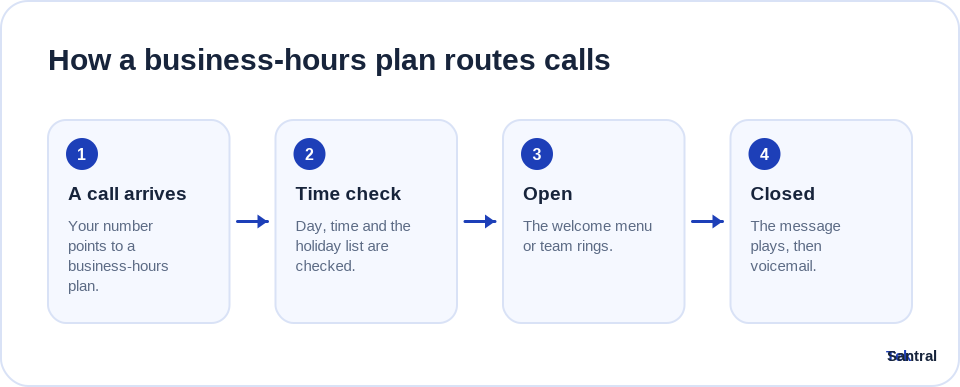
An after-hours message is a short recording that tells people calling outside your working hours that you are closed, when you reopen and what they can do. In a cloud PBX it switches on automatically according to your business-hours plan.
Callers should understand within seconds that they reached the right place, why nobody is answering and what they can do. A plain 15–25 second message is enough for most businesses.
Below are ready scripts for general, holiday, lunch and emergency messages, sector examples, recording tips and how to connect the message to your schedule.
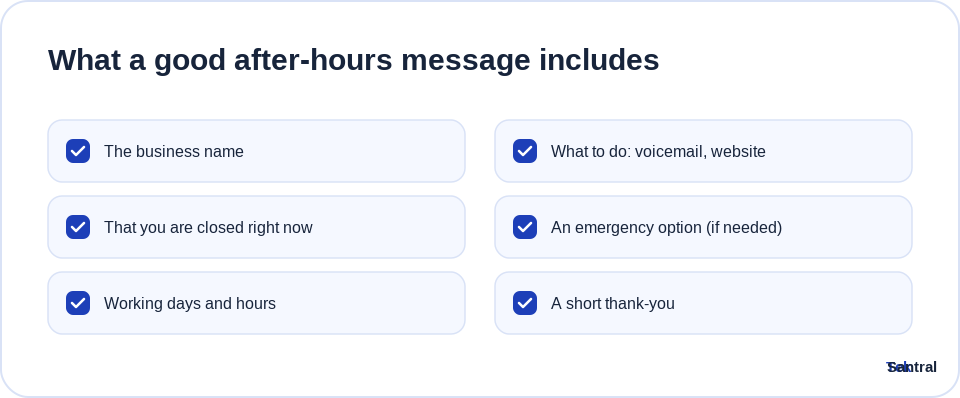
What a good after-hours message says
A good message answers the caller’s questions in advance:
General after-hours message
Example: “Thank you for calling. Our office hours are weekdays from 9 am to 6 pm. Please leave your name, phone number and a short note after the tone, and we will call you back on the next working day.”
For a more formal tone: “You have reached [Company]. We are currently closed. We are open on weekdays from 8:30 am to 5:30 pm. Please leave a message or use the contact form on our website.”
Public holiday message
Example: “We are closed today for the public holiday. You can leave a message or write to us through the contact form on our website. Have a good holiday.”
In TekSantral you add public holidays to the business hours as dates; on those days the after-hours flow applies automatically.
For long holidays, adding the return date sets expectations: “We are closed for the holiday until 3 April and back on 4 April.”
Lunch-break message
Example: “We are on our lunch break and back at 1:30 pm. You can leave a message after the tone.”
Add two working ranges to the same day in the business hours to set aside the lunch break.
Sample messages by sector
Examples to adapt to your business:
Clinics
“Our clinic is closed. To book, call weekdays 9 am–7 pm or book on our website. In a medical emergency, call 112.”
E-commerce
“Our customer service is closed. You can check your order on the order-tracking page of our website. Leave a message and we will call back first thing in the morning.”
Service centre
“We are closed. For an urgent fault press 9; for anything else please leave a message.”
Estate agent
“Our office is closed. You can browse our listings online. Leave your name and the listing you are interested in and an agent will call you.”
Related pages: Cloud PBX for Hotels: Reservations LineCloud PBX for Schools and CoursesCloud PBX for RestaurantsCloud PBX for Law Firms
Routing for urgent calls
Businesses with field service, healthcare or on-call staff can offer a key for urgent cases in the after-hours message: “For urgent technical support, press 9.” An IVR can send that key to the on-call person’s mobile.
To keep the emergency key for real emergencies, say briefly what counts as urgent and keep the on-call number up to date every week.
Related pages: How to Build an IVR Welcome Menu
Who listens to the voicemail?
Messages left out of hours collect in the mailbox of the person you chose during setup. If you gave an email address during setup, each new message arrives there as an audio file; messages can also be played by dialling *97 or in the panel’s Voicemail section. Deciding in advance who answers them on the next working day speeds up call-backs.
How to record it
You do not need a studio; a few simple rules are enough:
- Speak in a quiet room, a hand’s width from the microphone.
- Speak slowly and clearly; say the times one by one.
- Leave a second of silence at the start and end.
- Save as MP3 or WAV and upload it to the panel.
Message types at a glance
Recommended length and content for each type:
| Message | Length | Always mention |
|---|---|---|
| General after hours | 15–25 s | Hours and how to leave a message |
| Public holiday | 10–20 s | The holiday and the return day |
| Lunch break | 8–12 s | The return time |
| Emergency routing | 15–20 s | The emergency key and what counts as urgent |
Ways not to lose after-hours calls
After-hours calls often signal an urgent need or a new customer. To keep them, always offer a way forward at the end of the message: voicemail, the website form, an on-call phone for emergencies or a promise to call back first thing.
Build a routine of reviewing overnight voicemail and missed calls first thing in the morning. Filter the call history by date and time to see who called after hours and call them back in order.
Common mistakes in after-hours scripts
Avoiding these makes the message clearer:
Too long
Callers stop listening after 30 seconds; give the key information first.
Outdated hours
Update the message when hours change; wrong hours damage trust.
No way forward
Without voicemail or another channel, callers may ring a competitor.
Background noise
A message recorded in a noisy room sounds careless; record in a quiet room.
A calendar for holidays and special days
At the start of the year, add that year’s public and religious holidays to the schedule as dates, and define separate hours for half days such as holiday eves. You then never need to change the message by hand on holidays.
Who should answer after hours?
For some businesses after hours means just a message and voicemail; others want to answer calls in the evening too. In a cloud PBX you can make the after-hours destination a ring group and add the mobile apps of staff on evening duty. Important calls are answered even with the office closed, and when the rota changes you just update the group members.
How often should you update the message?
Update the message the same day your hours, address or website change. If you add promotion or busy-season information, put a reminder in the calendar to remove it. Listening to all messages once a year uncovers forgotten outdated details.
After-hours message vs welcome greeting
The welcome greeting plays during working hours and aims to route callers quickly, so it is short and focused on options. The after-hours message manages expectations: it explains why nobody answers, when you can be reached and what callers can do now. Recording both in the same voice and tone keeps your brand consistent.
Avoid adding promotions to the after-hours message; at that hour callers usually just want to know what they can do.
Different hours for different numbers
With several numbers or branches, each number can have its own schedule. For example the sales line may run weekdays 9–6, technical support on Saturdays too, and the shop number until 9 pm. Each plan plays its own after-hours message, so callers always hear that line’s real hours. Remember to add shared holidays to each plan.
How do you set up business hours in TekSantral?
The Easy number setup wizard builds the schedule by asking your hours and what should happen after hours (message and voicemail, or message only). Later you can change days, hours and holiday dates under Business hours, and temporarily switch the plan to “always open” or “always closed” if needed.
Related pages: Cloud PBX for Small BusinessesWhat Is a Cloud PBX? How It Works, Pricing