
What is an IVR welcome menu?
An IVR (Interactive Voice Response) is the voice menu that welcomes callers and routes the call to the right team based on the key they press. “Press 1 for sales, 2 for support” is a typical IVR.
A well-built menu gets the call to the right person first time, eases the load on reception and makes the business look more professional. A badly built one loses callers in long messages and confusing options. This guide shows how to build a menu that does not keep people waiting.
In this guide you will find every step to build a menu, from writing the script and laying out keys to timeouts and examples by sector.
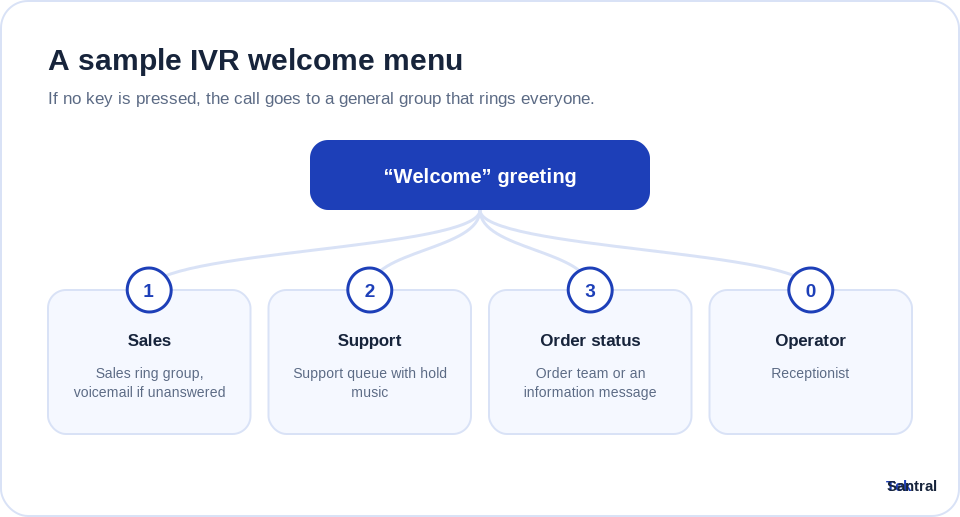
Keep the menu short.
Choose the essential options callers need. Use options based on why customers call, rather than a long list of departments.
In practice three or four options are enough for most businesses; more makes callers forget them. Order options by why you were called most in recent months: the most common reason should be number 1.
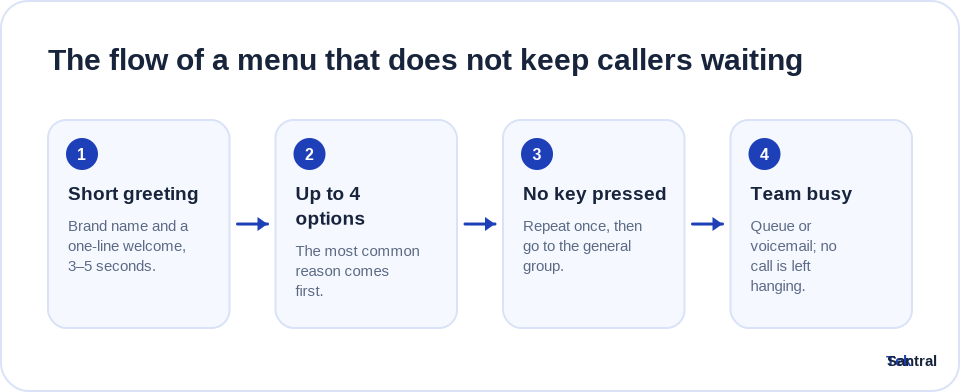
The greeting should be short too. Your brand name and a one-line welcome are enough; promotions or long legal text belong in the waiting music, not before the menu.
Write the message in your customer’s language.
For example: “Welcome to TekSantral. Press 1 for sales or 2 for technical support.” Use clear terms instead of internal department names.
Saying “for a new order” instead of “sales operations”, or “about your order” instead of “customer relations”, tells callers which key to press straight away. Say the option first and the key second: “For support, press 2” is easier to remember than “Press 2 to reach support”.
Sample greeting scripts
Examples you can adapt to your business:
Simple menu
“Welcome. For sales press 1, for support press 2, for accounts press 3. Stay on the line to speak to someone.”
Business with branches
“Welcome. For our Kadıköy branch press 1, for Beşiktaş press 2, for general information press 3.”
Busy period
“We are very busy right now. You can track your order on our website. To speak to someone press 1.”
For callers who know the extension
“If you know your contact’s extension, you can dial it now.”
What happens if the caller makes no selection?
Decide what happens when a caller makes no selection or presses an incorrect key. Consider replaying the menu or routing the call to reception.
Elderly callers, drivers or people in a hurry often press nothing. To avoid losing them, send unanswered menus to a general group that rings everyone rather than hanging up.
In TekSantral you choose separately where calls go on timeout and on an invalid key, and how many times the menu repeats. You can also add a short “invalid choice” message.
Recommended menu settings
Starting values that work well for most businesses:
| Setting | Recommended | Why |
|---|---|---|
| Greeting length | 3–8 seconds | Callers reach the menu quickly |
| Number of options | 3–4 | Easy to remember |
| Key timeout | 5 seconds | Enough to think, not too long |
| Repeats | 1–2 | Then the call goes to the general group |
| Ring time (ring group) | 20–30 seconds | Then voicemail or a queue |
Direct extension dialling and shortcuts
Some customers know who they work with. If you enable “dial the extension if you know it”, they skip the menu and reach that person directly.
Likewise, always connecting 0 to a person is a safe way out for callers lost in the menu.
Plan out-of-hours calls separately.
Explain the situation to callers outside working hours. Offer a voicemail flow or another appropriate way to contact you.
With a schedule, the same number goes to the menu during working hours and to the after-hours message otherwise. Add public holidays as dates so the right message plays on holidays.
Related pages: After-Hours Message Examples and Setup
Test with a real phone.
Check the announcement volume, that each key reaches the correct department, and that busy agents send calls to the queue. Test with different phones and lines.
Test like a customer: listen to the end, press nothing, press a wrong key and call after hours. For each scenario, note what you heard and where the call ended.
Menu examples by sector
When building your menu, you can borrow from similar businesses. What they share: the most common reason on 1 and the 0 key always connected to a person.
| Sector | 444 | 10 | 5 | 404 |
|---|---|---|---|---|
| Clinic | Appointments | Test results | Billing and insurance | Front desk |
| E-commerce | Order status | Returns | New orders | Account representative |
| Service centre | Report a fault | Visit status | Sales | Operator |
| Estate agent | For sale | For rent | Owners | Office |
Related pages: Cloud PBX for Hotels: Reservations LineCloud PBX for Schools and CoursesCloud PBX for Restaurants
How do you know the menu works?
After launching the menu, watch the call history for a few weeks. Look at when unanswered calls cluster, at callers who hang up while queuing and at the share of calls falling to the general group without a key press. Many calls in the general group mean the options do not match what callers want.
Staff feedback helps too: if most “support” callers actually ask about orders, rename or reorder the option. In a cloud PBX a menu change takes minutes, so review the menu whenever needed, not once a year.
Do you need a multilingual menu?
For hotels, exporters and tourism businesses with foreign customers, offering a language choice at the start helps: “For English, press 9.” The key leads to a separate English menu routed to the same teams. Alternatively, give foreign customers a separate number connected straight to the English menu, so Turkish callers hear no extra option.
How should you prepare the menu recording?
Write the script first and time it by reading aloud. Record in a quiet room at normal speaking distance and pause briefly after each option. Upload the file as MP3 or WAV under Audio files; the PBX converts it to phone quality itself.
Small settings that shorten waiting
To cut waiting times, think about the steps after the menu too. A ring group set to ring everyone at once lets the first free person answer; ringing in order suits cases where someone should have priority. Short information messages for callers waiting in a queue reduce hang-ups.
Finally, make sure the team behind the most chosen option has enough people. Even the best menu keeps callers waiting if nobody is there to answer.
Menus in campaigns and busy seasons
Call volumes rise sharply during sales, before holidays and at year end. Adding a short line at the start of the menu (“Delivery times for campaign products are on our website”) answers some callers before they enter the menu. Remember to remove it when the period ends. Connecting the relevant option to a queue and temporarily adding extensions to the team also cuts waiting times.
Setting up an IVR in TekSantral
You put a menu live in four steps:
- Upload your greeting under Audio files (MP3 or WAV).
- Create a menu under IVR menus and pick each key’s destination.
- Set where timeouts and invalid keys go.
- Point your number to the menu under Numbers.
Related pages: Call Centre PBX: Queues, IVR and RecordingWhat Is a Cloud PBX? How It Works, Pricing