SIP trunk: Your line stays with your provider. Your PBX runs on TekSantral.
What a SIP trunk is, how it works and how to connect it to a cloud PBX: IP routing vs SIP accounts, Verimor and NetGSM settings, security and channels.
What is a SIP trunk?
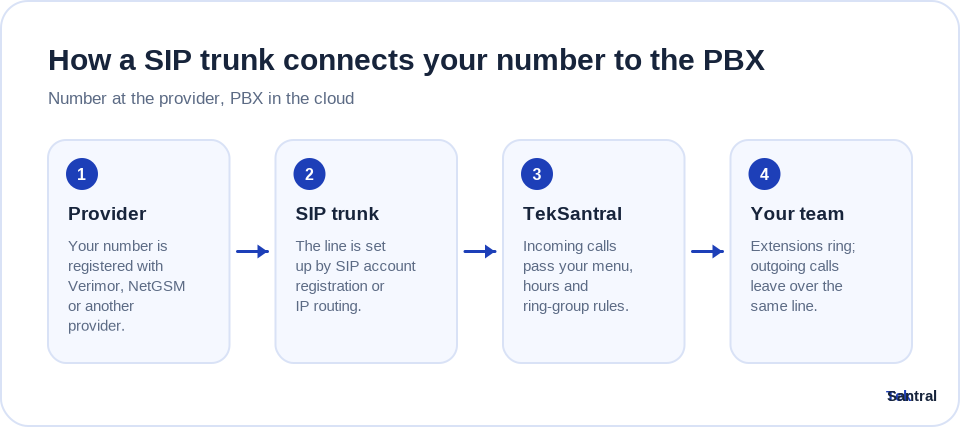
A SIP trunk is a virtual line that connects the phone number at your provider to a PBX over the internet. Numbers that once reached a PBX over copper or ISDN lines now travel over the internet using the standard SIP (Session Initiation Protocol).
A SIP trunk carries several calls at once; these are called channels. Your provider and your PBX plan together set the number of channels. At TekSantral every plan lets you connect several provider trunks and choose by priority which one outgoing calls try first.
Related pages: What Is a Cloud PBX? How It Works, Pricing
How is a SIP trunk different from a SIP account?
The two are often confused. A SIP account is the username and password your provider gives you; the SIP trunk is the line built with that account or with IP authorisation. An extension also connects with a SIP account, but that account belongs to the PBX, not to the provider.
| Term | What it does | Who issues it |
|---|---|---|
| SIP trunk | Connects your number to the PBX and carries calls | Built between the provider and the PBX |
| Provider SIP account | The trunk’s credentials (username, password) | Your provider |
| Extension SIP account | Lets a phone register to the PBX | The extension page in the TekSantral panel |
| Channel | How many calls can run at once | Provider and PBX plan |
How do you connect a SIP trunk to a cloud PBX?
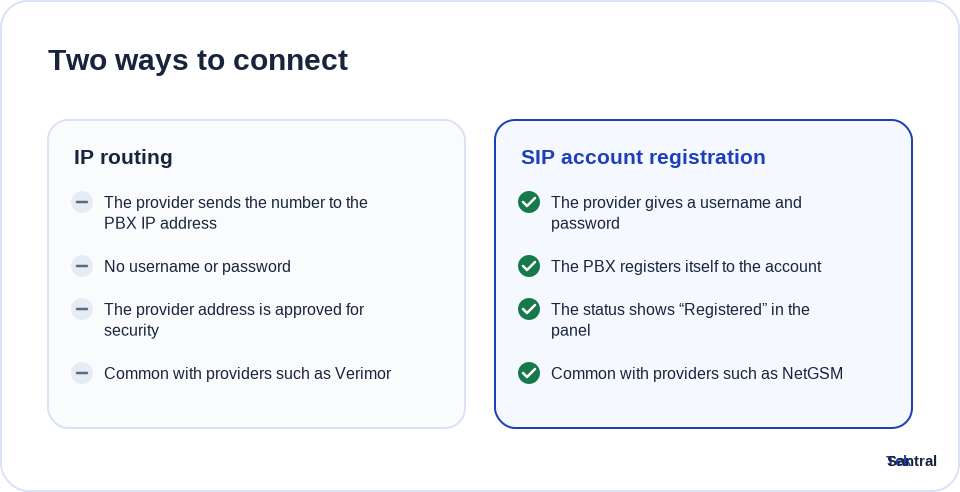
There are two ways. With IP routing your provider sends your number’s calls to the PBX address (port 5060), which your panel shows once your service is active; no username or password is needed, and the provider’s address is approved for security. With SIP account registration your provider gives you a username and password, and the PBX registers to the provider with them.
Your provider decides which one applies. Verimor usually uses IP routing and NetGSM usually uses SIP accounts; the panel has ready settings for both. With other providers you enter the server address, port and account details.
Related pages: Connecting a Verimor Number to a Cloud PBXCloud PBX Setup with a NetGSM SIP Account
What should you check when connecting a SIP trunk?
Set up correctly once, a trunk runs unchanged for years. These points matter during setup:
Number format
Pick whether your provider expects 0212…, 90212… or +90212…; the wrong format blocks outgoing calls.
Caller ID
Providers only allow numbers that belong to you; choose one of your approved numbers on each extension.
Channel limit
Enter the concurrent calls your provider allows; extra calls move to the next trunk.
Codec
Most providers in Türkiye use G.711 (alaw); the default setting is usually enough.
Backup trunk
Add a second provider trunk and outgoing calls switch to it automatically when the first is unreachable.
Minutes and credit
Turn on minute tracking on the trunk page to get an email when your package runs low.
Is a SIP trunk secure?
Because SIP lines run over the internet, they must be protected against unauthorised call attempts. At TekSantral, IP-routed trunks accept only approved provider addresses; a call from any other address cannot enter the PBX. Each customer’s trunks, numbers and extensions are isolated from everyone else.
International and premium numbers such as 0900 are blocked by default for outgoing calls and opened by support only when needed. Extension passwords are long and random; if a device is lost, you renew the password in one click.
How does a SIP trunk differ from a classic line?
A classic analogue line carries one call; a second caller hears busy. ISDN lines are limited by physical cards, and every new channel needs a hardware change. A SIP trunk is a software connection: channels grow as far as your provider allows and your plan supports, with no physical change.
Location independence is another key difference. A classic line is tied to a building and must move with the office. A SIP trunk connects to the PBX, so your number keeps working even if your office changes, which means uninterrupted moves for businesses opening branches or relocating.
| Feature | Analogue / ISDN line | SIP trunk |
|---|---|---|
| Concurrent calls | 1, or as many as the cards allow | Scales with provider and plan |
| Location | Tied to the building | Anywhere with internet |
| Setup | Cabling and devices | Configuration in the panel |
| Redundancy | Needs extra lines and hardware | Automatic with a second trunk |
What are the most common SIP trunk mistakes?
Most setup issues come down to a few simple causes that are easy to fix:
- Typing the provider username with a missing character or extra space; copy and paste is safest.
- With IP routing, the provider sending the number to the wrong address or port; it must be the PBX address shown in your panel, port 5060.
- Choosing a number format the provider does not expect, so outgoing calls are rejected.
- Picking a caller ID on an extension that the provider does not know.
- Not adding the number in the panel; the trunk works but calls have nowhere to go.
How do outgoing calls work over a SIP trunk?
When someone calls out, the PBX first checks the extension’s permissions: outbound access, international and premium restrictions and the concurrent call limit. It then adds the extension’s caller ID and sends the call over the highest-priority trunk. If that trunk is unreachable or full, the next one is tried.
With several providers, put the trunk of the number you call out with most at the top; providers only let you present numbers that belong to them. Emergency numbers such as 112 and short codes can always be dialled regardless of extension permissions.
Who should use a SIP trunk?
Any business that wants to keep its number and move its PBX to the cloud uses a SIP trunk. In particular:
- Businesses happy with their provider that want to drop PBX hardware.
- Those who want numbers from several providers on one PBX.
- Those who want to use different provider tariffs for outgoing calls.
Related pages: Business Numbers: 0850, 0212, 0216, 444Number Porting: Landline and 0850 Numbers
Do I need to change provider for a SIP trunk?+
No. You can stay with your current provider if it offers SIP lines; your number and tariff stay the same.
My provider gives no SIP account; what now?+
Ask your provider to route your number to the PBX address shown in your panel (port 5060). No username or password is needed then.
How many SIP trunks can one PBX use?+
Depending on your plan you connect 2 to 5 provider trunks. Outgoing calls try them in the priority order you set.
What if the trunk shows “Rejected”?+
Check the username and password from your provider and enter them again on the trunk page. If it persists, open a support request in the panel.
What is call quality like over a SIP trunk?+
On a stable connection quality matches classic lines. Most issues such as one-way audio come from SIP ALG on the router, which should be switched off.
Who bills the calls?+
Calls are billed by the provider of your number at its rates. The PBX plan does not include call charges.
Can I see the trunk’s minutes in the panel?+
Yes. Once you turn tracking on, talk time is calculated from PBX records; NetGSM accounts also show real credit and package figures.
Do I need a static IP address?+
No. The trunk runs between the PBX and the provider, so your office IP does not matter. Your phones can connect with a changing IP too.
Can emergency numbers be called?+
Yes. Emergency numbers such as 112 can always be dialled regardless of restrictions; the call leaves over your provider line.