Call centre wallboard: What is happening in the queue? See it at a glance.
Call centre wallboard: waiting callers, service level, abandon rate and agent status on one screen, with a TV link and instant alerts for supervisors.
What is a call centre wallboard?
A wallboard is the screen that shows the current state of a call centre. At a glance it shows how many people are waiting in the queue, how long the longest caller has been holding, how many calls have been answered today and which agents are free.
In TekSantral the wallboard is on the Wallboard page of the customer panel and is ready for every account that uses queues. No extra software or hardware is needed; any screen with a browser can be the board.
Related pages: Call Centre PBX: Queues, IVR and Recording
What does the wallboard show?
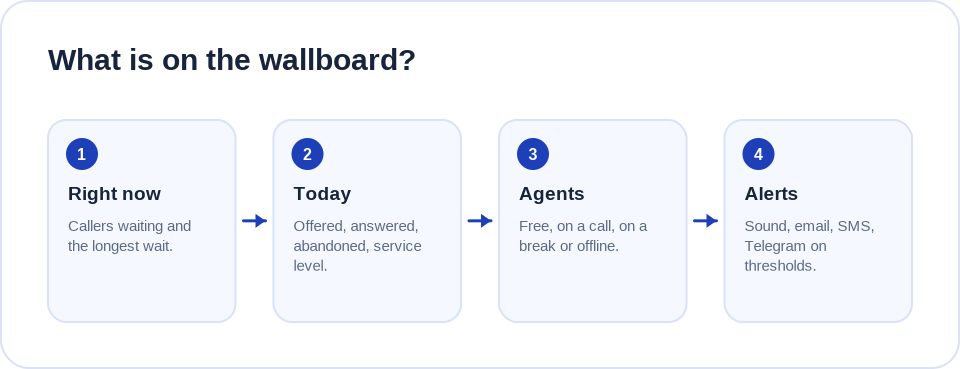
For each queue the board shows three kinds of information: what is happening now, today’s results and the agents.
Right now
The number of waiting callers, the longest wait and the list of waiting callers, plus customers in the callback list who are queued or still to be called.
Today
Offered, answered and abandoned calls, service level, and average and longest wait.
Agents
Each agent’s status and the number of calls they have taken today.
What do the wallboard figures mean?
These are the definitions of the figures on the board. The same definitions are used in the queue reports.
Related pages: Call Centre Metrics: 10 Core KPIs and Formulas
| Figure | Definition |
|---|---|
| Waiting | Callers currently waiting in the queue |
| Longest wait | How long the earliest caller in line has been waiting |
| Incoming | Calls that entered the queue today |
| Answered | Calls answered by an agent |
| Abandoned | Calls where the caller hung up before reaching an agent |
| Service level | Share of calls answered within the first 20 seconds |
| Average wait | Average time answered callers spent in the queue |
How is agent status tracked?
The board shows each agent’s current status: free, on a call, ringing, on hold, on a break (with the reason), do not disturb or offline. Supervisors immediately notice when callers are waiting but nobody is free, or when too many agents are on a break at once.
In log-in queues, agents use short codes on their phones. Break reasons can also be set through the API and appear with their durations in the agent report.
Related pages: Managing Your PBX from Your Phone
| Code | Action |
|---|---|
| *45 | Log in to the queue |
| *46 | Log out of the queue |
| *47 | Start a break |
| *48 | End the break |
How do I show the wallboard on an office TV?
For a TV or screen that isn’t signed in to the panel, you can create a secret TV link. The link needs no login; open it in a browser and the board runs full screen and refreshes by itself.
Because it sits in a shared space, the TV view hides callers’ phone numbers and shows only their wait times. The link is shown once when it is created; you can renew it or switch it off at any time, and the old link stops working immediately.
When and how are alerts sent?
You set thresholds for each queue. When one is crossed, the board plays an alert sound, a browser notification appears and a message goes to the channels you choose. While the alert lasts it is repeated every 30 minutes, and once things are normal for two checks a “resolved” message is sent.
Abandon rate and service level are calculated over the last hour, and at least 5 calls are needed to avoid false alarms. That way a single missed call first thing in the morning doesn’t look like a 100% loss and trigger a needless alert.
| Rule | When does it alert? |
|---|---|
| Wait time | A caller has waited longer than the set number of seconds |
| Callers waiting | The number of waiting callers passes the threshold |
| No agent | Callers are waiting but no agent is free or on a call |
| Abandon rate | The share of abandoned calls in the last hour passes the threshold |
| Service level | The share of calls answered within 20 seconds drops below the threshold |
| Callback backlog | The number of customers to call back passes the threshold |
Which channels do alerts use?
- Email: up to 5 addresses per queue.
- SMS: up to 3 mobile numbers.
- Telegram: the supervisor’s Telegram account or a team group.
- Webhook: the queue.alert event to your own system or CRM.
Related pages: PBX CRM Integration: API and Click-to-Call
Supervisor listen, whisper and barge
Supervisors listen in on live calls through the API. The supervisor’s phone rings and, when answered, joins the call in the chosen mode: silent listening, a whisper that only the agent hears, or barging into the conversation.
It is mainly used to coach new agents and to help with difficult calls. Callers must be informed about recording and monitoring.
Related pages: API Reference: CRM and Call Centre IntegrationCall Recording: Record and Replay Calls
How is the wallboard used in day-to-day management?
The board’s real value is acting before a problem grows. Habits that work for small teams:
Related pages: Queue Callback: Keep the Caller’s Place
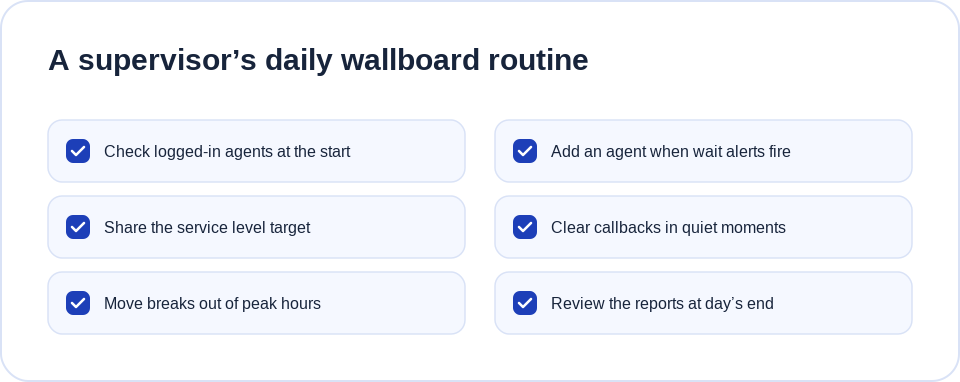
Move breaks out of peak hours
If callers are piling up while agents are on a break, postpone the break.
Clear the callback list
Call customers on the callback list during quiet minutes; the backlog alert reminds you.
Make the target visible
Share the service level target with the team and put the board on a screen everyone can see.
Close the day with a report
At the end of the day, review peak hours in the queue and agent reports.
Which plans include the wallboard?
The wallboard, SLA alerts and the auto dialer come with the call centre pack: TRY 249–599 a month depending on the plan (TRY 299 on the Starter plan; 10% off paid yearly, VAT included). Queue reports are in every plan. Plans: Mini TRY 489 a month with 5 extensions and 1 concurrent call, Starter TRY 599 with 10 extensions and 3 concurrent calls, Business TRY 789 with 25 extensions and 15 concurrent calls, Enterprise TRY 1,199 with 50 extensions and 25 concurrent calls (VAT included).
Related pages: Cloud and Virtual PBX Pricing 2026: From TRY 440 a Month
Do I need extra software for the wallboard?+
No. The board runs in the customer panel, so any computer or TV with a browser can be used.
Can someone who sees the TV link see customer numbers?+
No. The TV view hides callers’ numbers and shows only wait times. You can renew or switch off the link at any moment.
How is the service level calculated?+
Service level is the percentage of queue calls answered within 20 seconds. Alerts use the last hour, while the board shows the whole day.
Will the same alert keep repeating?+
No. While it lasts it is repeated every 30 minutes, and a single “resolved” message is sent when things return to normal.
How do agents take a break?+
Agents dial *47 on their phone to start a break and *48 to end it. In log-in queues, *45 logs in and *46 logs out.
Can a supervisor listen in from the panel?+
Listen, whisper and barge are started through the API; the supervisor’s phone rings and joins the call when answered.
Can the wallboard data go to another system?+
Yes. Live agent status, waiting callers and daily queue reports can be read through the API, and alerts are sent to your own system with the queue.alert webhook, so you can also build your own reporting screen.
How should I set the alert thresholds?+
Watch the board for the first week and note normal wait times and abandon rates. If you set thresholds a little above those values, alerts arrive only when action is really needed.
How many queues can be monitored?+
All queues in the account appear on the same board, and alert thresholds are set separately for each queue.