Call recording: Every call recorded. Every recording a lesson.
How does call recording work in a cloud PBX? Record inbound, outbound and internal calls, replay and download them from call history, and stay compliant.
What is call recording?
Call recording means the PBX automatically saves your business calls as audio files. It works independently of the device: whether an agent uses a desk phone, a mobile app or the browser phone, the call is recorded on the PBX.
In TekSantral, call recording is not an add-on; it is included in every plan. You play recordings from call history in the customer panel, download the ones you need and, if you like, pass them to your CRM through the API.
Related pages: What Is a Cloud PBX? How It Works, Pricing
Which calls are recorded?
Recording is switched on or off separately for three types of call. The settings apply to all your numbers, and you define exceptions per extension.
Related pages: Virtual PBX Features: The Complete List
| Setting | What is recorded? | Note |
|---|---|---|
| Inbound calls | Calls from outside numbers | Recording starts when someone answers; menus and waiting are not recorded. |
| Outbound calls | Calls your extensions make to outside numbers | Click-to-call calls follow the extension’s setting too. |
| Internal calls | Calls between your extensions | Most businesses leave this off. |
| Extension override | Follow the PBX setting, always or never | “Always” and “never” override the PBX-wide setting. |
Why set recording per extension?
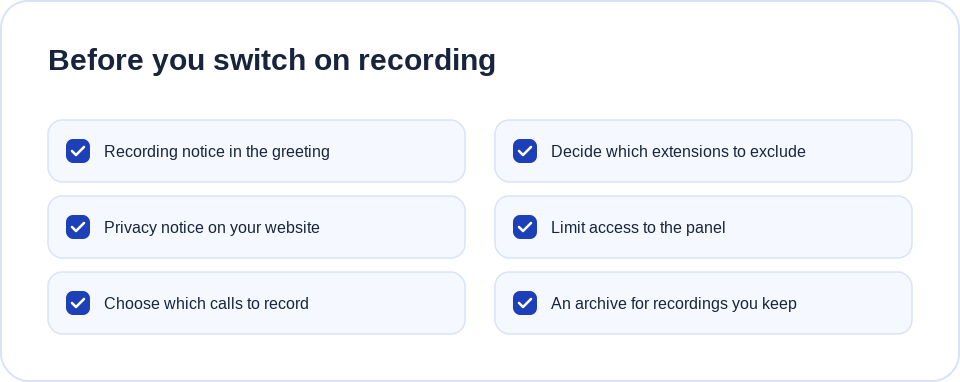
Not every team needs recording in the same way. You may record every call of your customer service agents while keeping a manager’s or HR’s extension out of recording.
Simply choose “never” in that extension’s settings. Conversely, if you do not record outbound calls in general, set a sales agent’s extension to “always” to record only that person’s calls.
How do you play and download recordings?
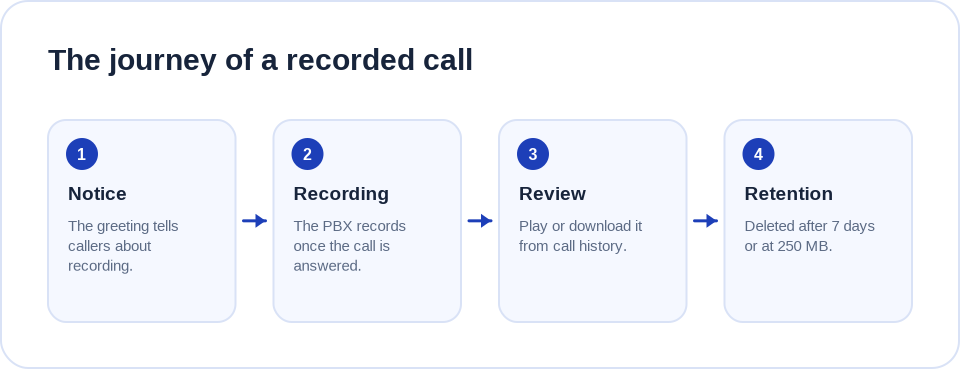
Every recorded call appears with a player on the Call history page of the customer panel. You find the call with filters, play it in the browser or download it as an audio file.
Related pages: Call Centre PBX: Queues, IVR and Recording
Date range
List the calls of a given day or week.
Direction
Separate inbound, outbound and internal calls.
Status
Filter answered and missed calls.
Number or extension
Search by a customer’s number or an agent’s extension.
CSV export
Export the list to Excel in one file; up to 5,000 rows.
How long are recordings kept?
Every plan keeps recordings for 7 days and up to 250 MB in total. Expired recordings are deleted automatically, and when 250 MB is reached the oldest recordings make room for new ones, so recording never stops.
If you need to keep a call longer, for example a complaint or a contract conversation, download it before it expires and store it in your own archive. You can also pull recordings automatically into your CRM or storage through the API.
If you want recordings kept on the PBX for the last 12 months, add the 12-month recording archive to your plan for TRY 499 a month (VAT included; TRY 449 paid yearly).
Related pages: Cloud and Virtual PBX Pricing 2026: From TRY 440 a Month
| Plan | Monthly fee | Retention | Storage |
|---|---|---|---|
| Mini | TRY 489 | 7 days | 250 MB |
| Starter | TRY 599 | 7 days | 250 MB |
| Business | TRY 789 | 7 days | 250 MB |
| Enterprise | TRY 1,199 | 7 days | 250 MB |
How do recordings work with a CRM?
The TekSantral REST API opens recordings and call details to your software. When a call ends, your CRM can download the recording and attach it to the customer record, so it stays in your system regardless of the 7-day retention.
Through the API you can add an outcome code, tags and a note to a call, and they appear in the panel’s call history. Deleting a single recording that is no longer needed is also done through the API, for example to meet a person’s erasure request.
Related pages: PBX CRM Integration: API and Click-to-CallAPI Reference: CRM and Call Centre Integration
Call recording and KVKK: what to watch
Recording a call is processing personal data. Callers must be informed before recording starts; see our call recording and KVKK guide for the full legal picture. In practice, three steps make a good start:
- Add a short notice at the start of the greeting: “Calls are recorded to improve our service.”
- Publish a privacy notice on your website explaining why you record, how long you keep recordings and how people can contact you.
- Give panel access only to people who need to listen to recordings, and keep downloaded recordings somewhere secure.
Related pages: Call Recording and KVKK: A Business Guide
Training
Let new agents listen to good and difficult calls.
Quality control
Listen to a few random calls each week and review them with the team.
Resolving disputes
Settle “what exactly was said” about an order, price or appointment.
Sales coaching
Compare won and lost calls and improve how conversations flow.
Probation reviews
Listen to a new hire’s calls in their first weeks and base feedback on concrete examples.
Notes
Fill in details from the recording when you could not keep up with notes.
How do you build a weekly quality routine with recordings?
Recordings pay off when someone listens to them regularly. In small teams, half an hour a week is enough: the manager picks one answered and one long call per agent from call history, the team listens together and agrees on one thing to improve.
Because recordings are kept for 7 days, hold the session on the same weekday and download any call you want to keep as an example that day. Discuss the call rather than the person, so agents come to see listening to their own calls as training.
How do you switch on call recording?
In the customer panel, open the Call recording section of the PBX settings page, tick inbound, outbound and internal recording as needed and save. The change reaches your PBX within seconds.
Then add the recording notice to your greeting and change the recording choice on extensions that need an exception. For a first test, call your business number from your own mobile; the recording appears in call history shortly after the call ends.
Related pages: What Is IVR? Interactive Voice Response Menus
Does call recording cost extra?+
No. Call recording is included in every TekSantral plan, with recordings kept for 7 days and up to 250 MB.
Can recordings be kept longer than 7 days?+
Packages keep recordings on the PBX for 7 days (250 MB) to play in the panel. With the recording archive, recordings are kept for 3 months (2 GB) for TRY 199 a month or 12 months (10 GB) for TRY 499 a month (VAT included; 10% off paid yearly). You can download recordings from the panel or send them to your own system automatically with the CRM and API module.
Are hold music and menus recorded too?+
No. For inbound calls, recording starts when someone answers; the IVR and queue waiting time are not recorded.
Can I exclude one employee from recording?+
Yes. Set the extension’s recording choice to “never” and that extension’s calls are not recorded.
Are calls from the mobile app recorded?+
Yes. Because recording happens on the PBX, calls on desk phones, the mobile app and the browser phone follow the same settings.
Can I delete a single recording?+
Deleting a single recording is done through the API. Otherwise recordings are deleted automatically when the retention period ends.
How do I tell callers about recording?+
The simplest way is a short notice at the start of your greeting. Give the full explanation in a privacy notice on your website.
Who can listen to recordings?+
People with access to the customer panel can play them from call history. We recommend giving access only to those who need it.