
What does moving to a cloud PBX mean?
Moving to a cloud PBX means replacing the office PBX box or separate fixed lines with a service that runs PBX functions over the internet. Your numbers stay the same; extensions, greetings, menus and routing rules are managed in a web panel.
In a well-planned move your customers notice nothing: they dial the same number and reach the same team. This guide explains the order to follow for an uninterrupted switch and the most common mistakes.
Which businesses should move to a cloud PBX?
Businesses that must replace an old PBX after a fault, run several branches, have remote or field staff, or want to route their number to different people as they grow benefit most from a cloud PBX.
Even for a small office with a single line, a greeting, an after-hours message, voicemail by email and calls ringing on mobiles make a difference in not losing customers.
| Topic | On-premise PBX | Cloud PBX |
|---|---|---|
| Upfront cost | PBX box, cards and cabling | No hardware; monthly plan |
| Making changes | Needs a technician or remote access | Instantly in the web panel |
| Remote work | Limited; extra hardware | Extensions work anywhere |
| Branches | A box per branch | All branches on one PBX |
| Scaling | Card and port limits | By changing plan |
Related pages: What Is a Cloud PBX? How It Works, PricingCloud PBX for Multi-Branch Businesses
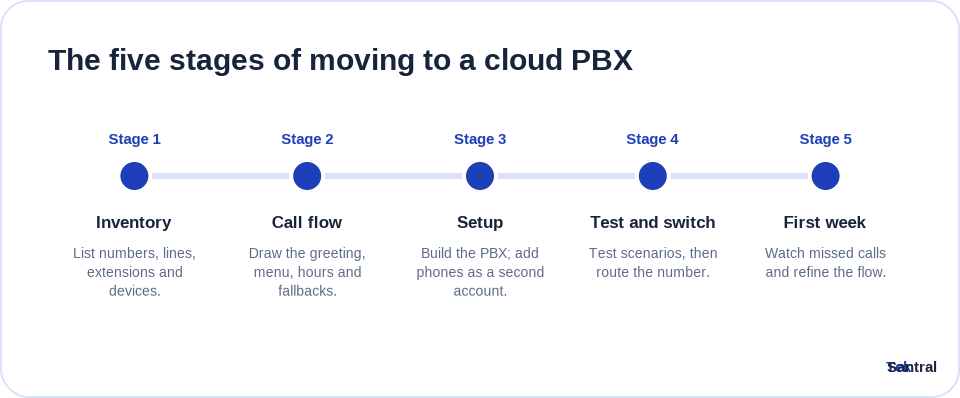
1. List your current system.
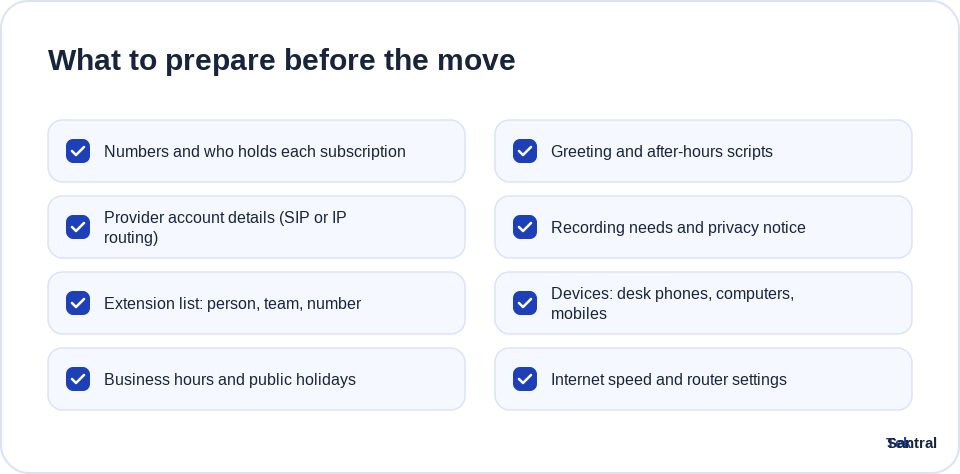
The first step is knowing what you have. Put every number in a table with its provider and subscription holder, the extensions and their users, and the phones with make and model. Add working hours per branch and which teams answer calls.
The list is also a chance to clean up: dropping extensions nobody uses and numbers nobody calls keeps the new PBX simple and helps you choose the right plan.
2. Map your call flow.
Write down where calls arrive first, the menu choices, what happens if no one answers, and the out-of-hours flow. Department names are easier to maintain than frequently changing staff names.
A sample flow: the number is dialled → short greeting → 1 for sales, 2 for support → the team’s ring group rings for 20 seconds → voicemail if unanswered. After hours, straight to the “our hours are…” message and voicemail.
Related pages: How to Build an IVR Welcome MenuAfter-Hours Message Examples and Setup
3. Review capacity and connectivity.
Count extensions and the calls that may run at the same time at peak separately. An extension is a person or device with a phone; concurrent calls is how many conversations can happen at once. A 20-person office may need 6–8 concurrent calls; busy teams such as call centres need more.
On the internet side a call uses about 100 kbit/s; 10 simultaneous calls need roughly 1 Mbit/s of free download and upload capacity. For audio quality, a stable connection matters more than raw speed.
| Plan | Extension | Concurrent calls | Number | Price |
|---|---|---|---|---|
| Mini | 25 | 444 | 444 | TRY 489 |
| Starter | 1 | 5 | 10 | TRY 599 |
| Business | 25 | 1 | 25 | TRY 789 |
| Enterprise | 50 | 15 | 1 | TRY 1,199 |
Related pages: Cloud and Virtual PBX Pricing 2026: From TRY 440 a Month
4. Choose how to connect your number.
There are two common ways to connect your number to a cloud PBX. If your provider gave you a SIP username and password, the PBX registers with that account (NetGSM works this way). If your provider uses IP routing, you ask it to send the number’s calls to the PBX IP address (Verimor works this way).
If you have no number yet or want a new 0850, city or 444 number, TekSantral, as a dealer of licensed fixed-line operators, has it allocated in your name and connects it to your PBX.
Related pages: What Is a SIP Trunk? Connect Your LineCloud PBX Setup with a NetGSM SIP AccountConnecting a Verimor Number to a Cloud PBX
5. Test before you switch.
Build the new PBX while the old system is still running. Add the new extension to phones and computers as a second account so nothing is missed while staff get used to it. Test inbound, outbound, transfers, menu keys, queues and after-hours scenarios one by one.
While testing, call from different providers and mobiles, press wrong keys and check what happens when nobody answers. If all is well, route the number to the new PBX or agree the porting date with the provider.
Switching steps in TekSantral
In TekSantral most of the move is done by the Easy number setup wizard: you choose your number and provider and say who answers, what callers hear and your hours. The wizard creates the trunk, extensions, greeting, schedule and voicemail together.
After setup each extension’s SIP details appear in the panel; a desk phone, computer app or mobile can share an extension and all ring together. If you hit a problem you can open a support request in the panel.
- Open your account in the panel and choose a plan.
- Set up your first number with Easy number setup.
- Add phones as a second account and test.
- Route the number or set the porting date.
6. Watch the first days.
In the first week after the move, check missed calls in the call history, which menu key is chosen most and queue waiting times. Collect staff feedback: whose phone did not ring, which transfer was awkward.
Adjust ring times, menu order or business hours based on what you see. In a cloud PBX such changes take minutes in the panel; there is no technician to wait for.
How do you plan the switch-over day?
Pick the day the number moves to the new PBX for your quietest time; for many businesses that is an early weekday morning or a Friday afternoon. Make a few test calls right after the switch, and write down the rollback step in advance: returning to the old routing is usually a few minutes in the provider panel.
Name one person as the “PBX lead” for the day. They collect “my phone is not ringing” reports, check the extension list and open a support request if needed. A single owner stops the same problem being reported many times.
What should staff be told?
Basic use of a cloud PBX feels familiar to most staff, but a few new habits need a short briefing: transferring, putting calls on hold, listening to voicemail (*97) and using the mobile app. A one-page note on these topics greatly reduces questions in the first week.
Also tell staff whether their extension numbers change, how internal calls work and how to use the same extension from home. Staff who can connect their own phones lighten the setup load too.
How do you work out the cost of moving?
A cloud PBX cost has three parts: the monthly plan, your provider’s call and number charges, and phones if you need them. The maintenance, card upgrades and technician fees of a classic PBX disappear. When comparing, include the yearly maintenance and repair costs of your current system.
What gets easier after the move?
What businesses notice most after moving is that small changes no longer wait: adding an extension for a new hire, a holiday message or a branch ring group takes minutes in the panel. With call history and recordings in one place, spotting and returning missed calls gets easier too.
Common mistakes
The problems we see most in migrations and simple ways to avoid them:
Closing the old line too early
Do not close the old line or PBX before testing; run both for a few days.
Leaving SIP ALG on
The most common cause of one-way audio and dropped calls; turn it off on the router.
Forgetting after hours
Without hours and holidays, evening calls ring out unanswered.
Skipping the recording notice
If calls are recorded, add a short notice informing callers.
Related pages: Call Recording and KVKK: A Business GuideSupport and Setup Guides