
What is a greeting message?
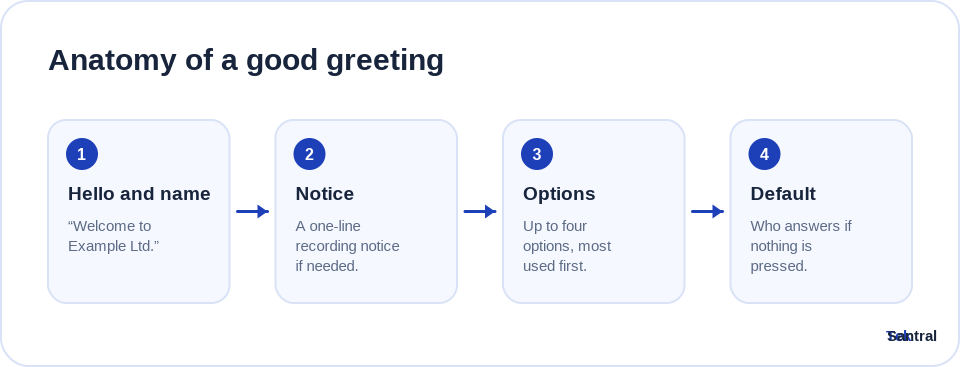
A greeting is the first message callers hear when they dial your business. A good greeting confirms they reached the right place, says clearly what to do next and gets them to the right person quickly.
A greeting is usually paired with an IVR menu: “press 1 for sales, 2 for support”. On a cloud PBX you upload the greeting as an audio file, define menu options in the panel and change them whenever you like.
Related pages: How to Build an IVR Welcome Menu
Business greeting examples
Adapt the scripts below to your business. Replace the bracketed parts and keep only the options you need.
General business greeting
“Welcome to [Company]. Press 1 for sales, 2 for support, 3 for accounts. To speak to an agent, please hold.”
Short and simple
“Welcome to [Company]. We are connecting you to one of our team.”
With a recording notice
“Welcome to [Company]. Calls are recorded to improve our service. Press 1 for orders, 2 for returns and exchanges.”
With branch choice
“Welcome to [Company]. Press 1 for our Kadıköy branch, 2 for Beşiktaş, 3 for general information.”
Busy period
“Welcome to [Company]. We are busy today; the next agent will be with you shortly. To leave a message instead, press 9.”
Related pages: After-Hours Message Examples and Setup
Greeting examples by sector
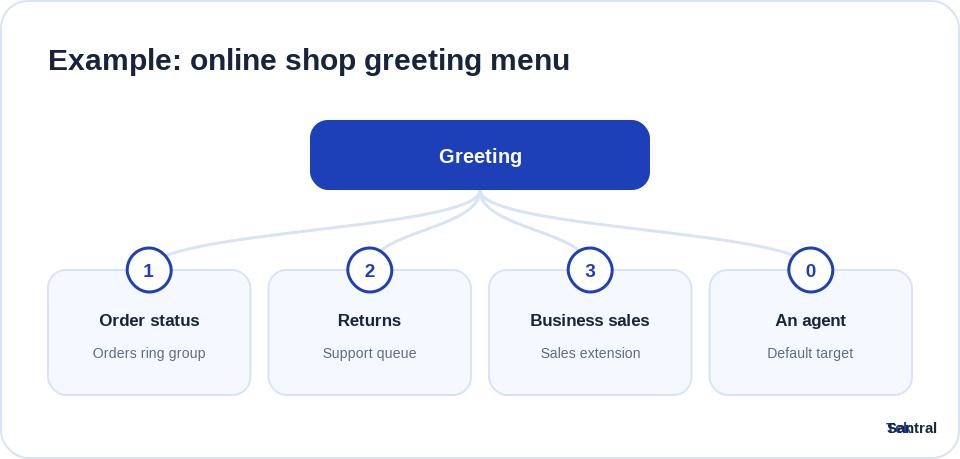
The most common question differs by sector. Build the menu around it so callers reach the right place with the first option.
| Sector | Example greeting | First option |
|---|---|---|
| Clinic | “Welcome to [Clinic]. Press 1 for appointments.” | Appointments |
| E-commerce | “[Store] customer service. Press 1 for order status.” | Order status |
| Estate agent | “Welcome to [Agency]. Press 1 for sales listings, 2 for rentals.” | Sales listings |
| Service centre | “[Service]. Press 1 to report a fault.” | Report a fault |
| School | “Welcome to [School]. Press 1 for enrolment.” | Recorded |
| Restaurant | “[Restaurant]. Press 1 for takeaway, 2 for reservations.” | Takeaway |
Related pages: Cloud PBX for E-commerce: Orders and ReturnsCloud PBX for Clinics and PracticesCloud PBX for Hotels: Reservations LineCloud PBX for Law FirmsCloud PBX for Real Estate Agencies
How do you write an effective greeting?
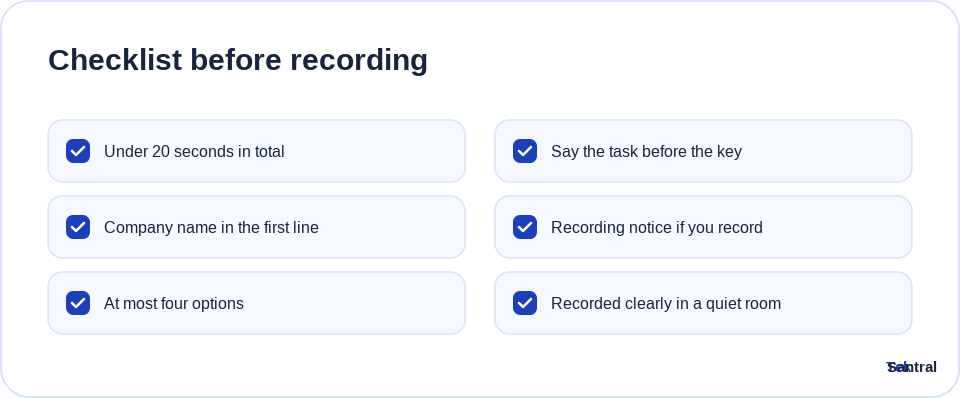
Above all, a greeting should be short. Callers want to hear what to do, not a long company introduction. Say your name in the first line, order options by use and avoid more than four.
Name the task before the key: say “For sales, press 1” rather than “Press 1 to reach sales”, so callers hear their topic and the key together. Always set a default for callers who press nothing; people who cannot or will not choose must still reach someone.
How do you record and upload a greeting?
You can use a professional voice-over service or record it yourself in a quiet room with a good microphone or phone. What matters is no background noise and a clear, calm voice. Leave half a second of silence at the start and end.
At TekSantral you upload the recording under Audio files; common formats are converted automatically for the PBX. Then choose it as the greeting in the IVR menu and define key options. The Easy number setup wizard also walks you through uploading the greeting.
- Read the script aloud and time it.
- Record in a quiet room, a hand’s width from the mic.
- Upload the file under Audio files.
- Select it as the greeting in the IVR and set the keys.
- Call from another phone to listen and re-record if needed.
Related pages: What Is a Cloud PBX? How It Works, Pricing
Seasonal and special-day greeting examples
Holidays, New Year and campaign periods are good moments to refresh your greeting. When you define holidays in the business-hours plan, a special message plays automatically on those days and the normal flow returns afterwards, so there is no need to swap messages by hand each time.
Keep seasonal messages short too. Limit greetings to one sentence and say straight away what callers can do: when you reopen, how to leave a message or which option to use in an emergency.
Religious holiday
“[Company] wishes you a happy holiday. We are closed during the holiday and back on [date]. Leave a message and we will call you back.”
New Year
“Happy New Year from [Company]. We are closed on 1 January; please leave a message.”
Campaign period
“Welcome to [Company]. Press 1 for our campaign, 2 for existing orders.”
Summer hours
“During summer we are open weekdays 9 am to 5 pm. Outside these hours, please leave a message.”
Related pages: After-Hours Message Examples and Setup
How do you write hold and queue messages?
Messages played to queued callers make waiting easier. A good hold message tells callers they are not forgotten, offers an alternative if useful and repeats briefly between hold music. Repeating it too often annoys people.
Useful information makes the wait worthwhile: your order tracking page, FAQs or opening hours. But when pointing callers to another channel, always say they will not lose their place in line.
- “All our agents are busy. Please hold; you will keep your place.”
- “You can also check your order on our website’s tracking page.”
- “To leave a message instead, press 9 and we will call you back shortly.”
Related pages: Setting Up a Call Centre for Small Teams
Choosing voice and tone for a greeting
The voice on your greeting is your first impression. A calm, formal tone suits a law firm, while a café or children’s activity centre may prefer something warmer and livelier. What matters is matching the rest of your brand’s communication.
Pace drives clarity. A rushed greeting, especially with numbers or dates, gets missed. Short pauses between options give callers time to choose. If you use background music, keep the voice clearly on top and pick simple music that does not sound muddy over the phone.
- Choose a voice that fits your brand.
- Leave short pauses between options.
- Keep music under the voice.
Testing and updating your greeting
Before publishing a new greeting, call from different phones in and out of hours. Check that each option reaches the right team, the default target works when nothing is pressed and the greeting sounds clear on the line. Having a few colleagues listen reveals ambiguities you may miss.
Review the greeting several times a year: when hours, team structure or services change, the greeting should too. On a cloud PBX, uploading and selecting a new recording takes minutes and applies at once.
Remember, the greeting is your business’s voice. A short, clear and current message gives a professional impression, and reaching the right person quickly reinforces it. Start by adapting the examples in this guide, then simplify the menu and script using the first week’s call history, so callers reach the person they need quickly and without effort every time.
Common greeting mistakes
Greetings are often recorded once and forgotten. A greeting that mentions an old campaign, a closed branch or an option no longer in use undermines trust. Listen to yours at the start of each season and keep it current.
- Opening with a long company introduction.
- Offering more than five options.
- Having no target when nothing is pressed.
- Background music louder than the voice.
- Playing the same greeting after hours.
Related pages: 10 Ways to Reduce Missed Calls