Auto dialer: Upload a list. Let the PBX make the calls.
Call the numbers on your list with a recorded announcement or connect answered calls to your agents. With calling hours, retries and opt-outs.
What is an auto dialer?
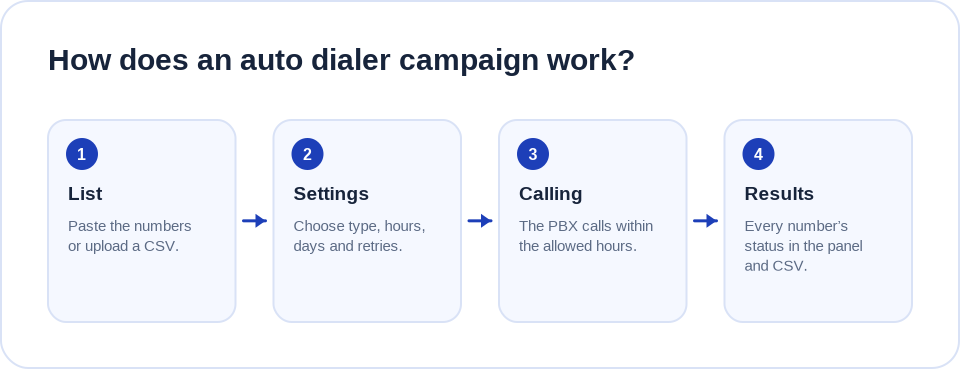
An auto dialer is the PBX calling a list of numbers one after another on your behalf. Instead of a person dialling, the PBX places the call; when the other side answers, your recorded announcement plays or the call goes straight to an agent. This way you reach hundreds of people with the same information without dialling each number by hand.
In TekSantral the auto dialer is managed from the Auto dialer page of the customer panel. You upload the list and choose the campaign type and hours; the PBX makes the calls and records the result for every number.
Two campaign types: voice broadcast and agent campaigns
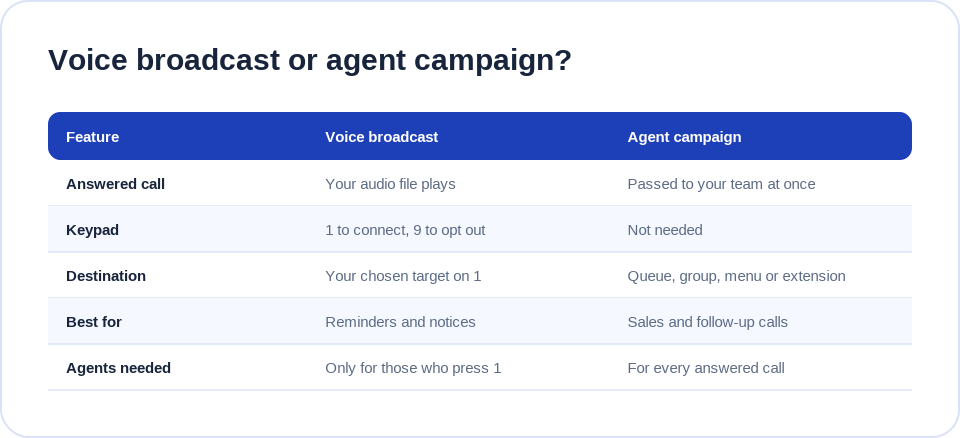
When you create a campaign, you choose what happens to an answered call:
Related pages: Call Centre PBX: Queues, IVR and RecordingWhat Is IVR? Interactive Voice Response Menus
Voice broadcast
Your audio file plays on the answered call. Pressing 1 connects the listener to the destination you choose (for example the sales queue); pressing 9 adds them to the do-not-call list. Calls of people who only listen end after 10 minutes at most.
Agent campaign
The answered call goes straight to a queue, ring group, IVR menu, extension or announcement. Sales and reminder teams only talk to people who picked up, with no idle dialling.
What is an auto dialer used for?
The most common uses are notices the person already expects or has agreed to receive:
Appointment reminders
Remind people of a clinic, service or course appointment a day ahead; anyone who needs a change presses 1 to reach your team.
Campaign announcements
Tell customers who have opted in about a new offer; anyone interested presses 1 and joins the sales queue.
Payment reminders
Remind customers of upcoming payments; anyone with a question goes straight to your accounts team.
Service notices
Share delivery days, a change of address or a service interruption with the whole list in one short announcement.
Consent for commercial calls
Promotional and sales calls count as commercial electronic messages under Turkish Law No. 6563. Before such calls, people must have given consent and the consent must be registered in the Message Management System (İYS). When you save a campaign you must tick a box confirming this responsibility; the campaign is not saved without it.
People who press 9 to opt out are added to the do-not-call list automatically. Adding opt-outs recorded in İYS to this list is your responsibility.
Related pages: Auto Dialing and İYS: A Guide to the Rules
How do you prepare the call list?
You can paste the list into the panel or upload it as a file. The PBX reads the list with these rules:
- A CSV or TXT file of up to 2 MB. If you use Excel, save the file as CSV; XLSX files cannot be uploaded directly.
- Column order does not matter: the first valid number on a line is taken as the number and the first text cell as the name.
- Semicolons, tabs, commas or vertical bars can be used as separators.
- Older Excel files with Turkish characters (Windows-1254) are read correctly too.
- A number written more than once is called only once.
- A campaign holds up to 10,000 numbers.
Which numbers can be called?
The auto dialer calls Turkish landlines, mobiles, 0850 and 0800 numbers. Foreign numbers, premium-rate service numbers and service codes such as 811, 812, 822 and 888 are removed from the list, so a faulty list cannot lead to an unexpected bill.
Numbers on the do-not-call list are skipped in every campaign and appear as “do not call” in the results.
Campaign settings
You choose the following settings for each campaign:
| Setting | Options | Default |
|---|---|---|
| Calling hours | A window between 08:00 and 21:00 | 09:00–20:00 |
| Calling days | Any days of the week | Days you select |
| Starter | Now or up to 90 days ahead | Now |
| Ring time | 15–60 seconds | 30 seconds |
| Retries | 0–3 times | Once |
| Retry interval | 10–240 minutes | 30 minutes |
When and how fast are calls made?
The PBX only calls on the days and within the hours you choose; the window starts at 08:00 at the earliest and ends at 21:00 at the latest. Numbers outside the window wait for the next allowed time. Busy, unanswered or failed calls are retried up to three more times at the interval you choose.
The number of simultaneous calls is set by your account’s channel limit and your plan’s concurrent call limit. When incoming calls fill the line, the dialer waits without using up an attempt, and the same number is never called twice at once.
Results and reports
Every number’s status is shown on the campaign page: queued, calling, answered, pressed 1, opted out (9), busy, no answer, failed, do not call or cancelled. The panel shows the latest 100 results, and you can download the full list as CSV with name, status, number of attempts and last call time.
If you work with a CRM, every result reaches your system as a webhook event, so the outcome is logged on the customer record automatically.
Related pages: PBX CRM Integration: API and Click-to-CallAPI Reference: CRM and Call Centre Integration
Do-not-call list
The do-not-call list applies to all campaigns in your account. People who press 9 are added automatically; you can also add numbers by hand, from a CSV file or through the API. The list can be downloaded as CSV at any time, so you can match your opt-out records with your other systems.
How do you switch it on, and what does it cost?
The auto dialer is switched on with operator approval after you send a request from the customer panel. The approval sets how many calls your account may make at once (up to your plan’s concurrent call limit) and a daily call cap.
The auto dialer comes with the call centre pack (TRY 249–599 a month depending on the plan, VAT included). Calls go out over your own provider line, and your provider bills the call minutes at its own rates.
Related pages: Cloud and Virtual PBX Pricing 2026: From TRY 440 a MonthWhat Is a SIP Trunk? Connect Your Line
Do I need to install separate software for auto dialing?+
No. Campaigns are created in the TekSantral customer panel and the PBX makes the calls itself.
Can I upload my Excel list?+
Save the file as CSV in Excel and upload it. XLSX files are not accepted directly, and the column order does not matter.
How many numbers can a campaign hold?+
A campaign holds up to 10,000 numbers. A number written more than once is called only once.
How does a called person opt out?+
They press 9 while listening to the announcement. The number is added to the do-not-call list and is not called in later campaigns.
Are calls made at night or at weekends?+
Calls are only made between 08:00 and 21:00, within the hours and on the days you choose. If you do not select weekend days, no calls are made then.
Are unanswered numbers called again?+
Yes. Busy, unanswered or failed calls are retried up to three more times at intervals of 10 to 240 minutes.
Which number do the calls come from?+
Calls go out over your provider line; the person called sees your business number and reaches your PBX if they call back.
Can I call foreign numbers?+
No. The auto dialer only calls Turkish landline, mobile, 0850 and 0800 numbers.