Number porting: Keep your familiar number. Renew your communication.
What number porting is, how landline and 0850 numbers move and which documents you need: a step-by-step guide to an uninterrupted cloud PBX move.
What is number porting?
Number porting means changing your provider without changing your number. The number your customers know stays the same; only the carrier and line change. In Türkiye fixed and business numbers can be ported too, following the applicable rules and operators.
You do not always need to port to move to a cloud PBX. If your current provider offers a SIP line, the number stays there and connects to the PBX. Porting makes sense if your provider has no SIP lines, you want a better tariff or you want all numbers with one provider.
Related pages: What Is a SIP Trunk? Connect Your LineWhat Is a Cloud PBX? How It Works, Pricing
Do I need to port my number?
The table sums up what to do in each case:
| Status | Recommendation | Does the number change? |
|---|---|---|
| Your provider offers SIP lines | No porting; connect the line | No |
| Your provider only offers classic lines | Port to a SIP provider | No |
| You want a better tariff | Open a porting request | No |
| You want a new number | A new number allocation | A new number is added |
How does the porting process work?
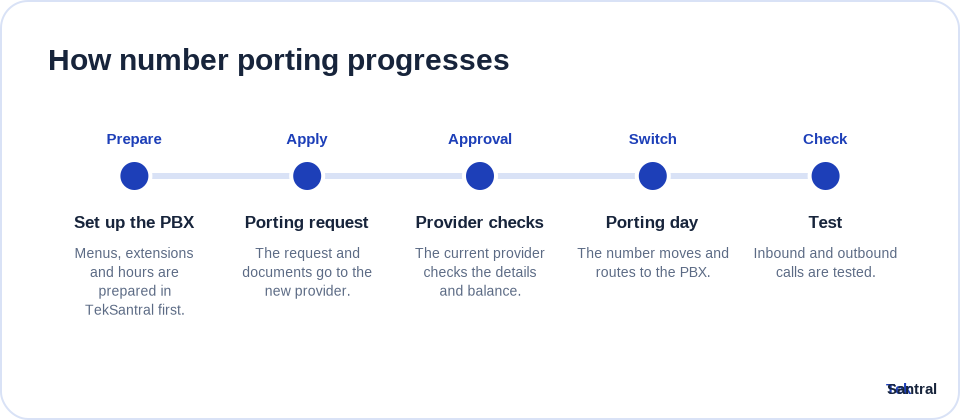
Porting starts with an application to the new provider. The new provider asks the current one to release the number; the current provider checks the subscription and any debts or commitments. Once approved, the number moves on the agreed day. Timing depends on the operators, the number type and complete documents.
The way to minimise downtime is to prepare the PBX before porting day. In TekSantral menus, extensions and hours are set up in advance, so calls go to the right place the moment the number reaches the new line.
Which documents does porting need?
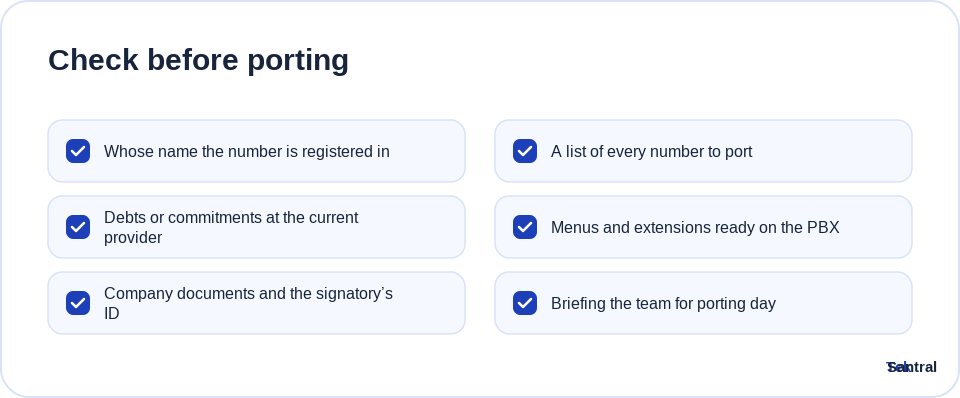
Operators usually ask for the owner’s company name and tax details, the authorised person’s ID, proof of signing authority and the porting form. The application must come from whoever the number is registered to. The exact list varies by operator and is shared in your request.
Related pages: Business Numbers: 0850, 0212, 0216, 444
Are calls cut during porting?
There can be a brief moment as the number moves between providers. Keep it short by scheduling porting day for a quiet time, preparing the PBX in advance and making test calls from a mobile and a landline right after.
Set up in advance
Have menus and extensions ready in TekSantral before porting day.
A quiet time
Schedule porting for after hours or early in the week.
Brief the team
Let staff try their new devices and apps beforehand.
Test calls
Test inbound and outbound calls right after the switch.
What should you check after porting?
After the number moves, run a short checklist to make sure everything works:
Inbound calls
Call the number from mobiles and landlines on different networks; greeting and routing must work.
Outbound calls
Call out from extensions and check the right number shows at the other end.
Out of hours
Temporarily switch the schedule to “closed” and test the message and voicemail.
Notifications
Confirm voicemail emails reach the right address.
How do you choose between porting and a new number?
If customers have known your number for years and it appears in ads, signs and business cards, porting is almost always right; the number is a valuable asset. For a new brand, branch or separate service line, a new number is quicker and more flexible.
You can also combine them: port your existing number and add a new 0850, sending each to a different team on the same PBX.
Why does porting get delayed?
Most delays come from a few recurring causes. The most common is the company name or ID on the application not matching the registered details exactly. An unpaid bill or an unfinished commitment at the current provider can also stop porting. When porting several numbers, a missing number on the list splits the process into a second application.
Checking your latest bill and subscription details before applying, and preparing a complete number list, speeds things up.
How should businesses with several numbers plan porting?
For businesses with branches or several service lines, porting every number on the same day is not always best. Port the least critical number first to test the process, then plan the main number for a quiet day. For each number, decide in advance which greeting and team it goes to on the PBX.
Numbers not yet ported keep working at the old provider; if it offers SIP, they can connect to the PBX from there temporarily, so calls never stop while everything moves to one PBX.
How do you port with TekSantral?
Open a “Number porting” request under Support requests in the panel with the numbers and your current provider. As an authorised reseller our team starts the process in your name, lists the documents and plans porting day with you. Meanwhile you can keep setting up your PBX.
Related pages: Cloud PBX Migration Guide and ChecklistSupport and Setup Guides
How long does porting take?+
It depends on the operators, the number type and complete documents. With complete documents it usually moves quickly; the exact date is planned in the request.
Can an 0850 number be ported?+
Generally yes. 0850 numbers can be ported; terms vary by operator.
Do I need to call my current provider?+
You apply through the new provider, which contacts the current one. If there are debts or commitments, you may need to settle them first.
Could my number go to someone else?+
No. Porting requires the owner’s application and identity check; the number moves in your name.
Can I port several numbers together?+
Yes. List every number in your request; they can be planned for the same day.
Can I move to a cloud PBX without porting?+
Yes. If your provider offers SIP, the number stays there and connects to the PBX.
Should I switch off my old PBX during porting?+
No. Keep the old PBX running until porting completes; once the number moves, calls start reaching TekSantral.
Is porting charged?+
Porting fees and terms vary by operator and are shared in your request.