
What is this glossary for?
This PBX glossary gathers the most common cloud PBX and business telephony terms in short, plain definitions. Use it to understand terms quickly when comparing offers, using the PBX panel or talking to your provider.
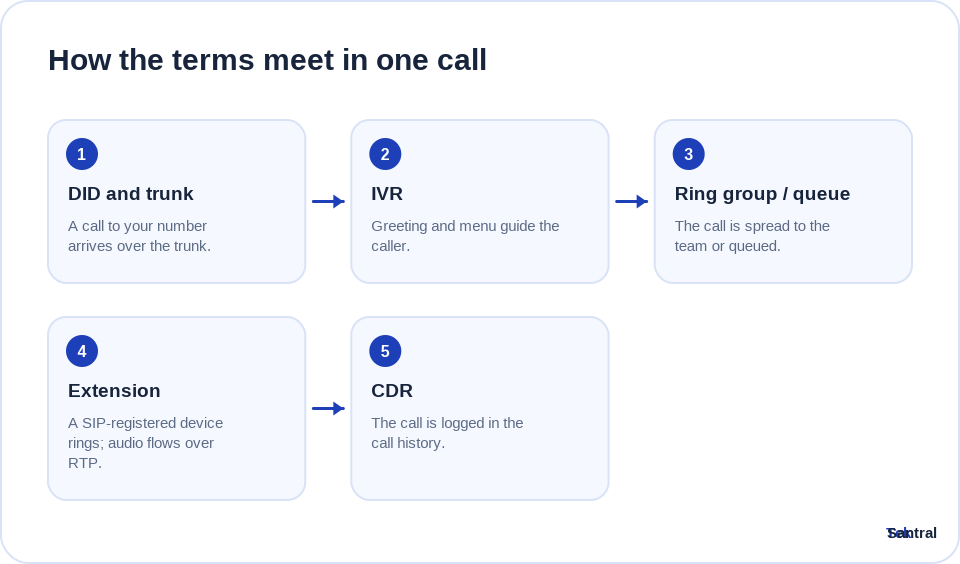
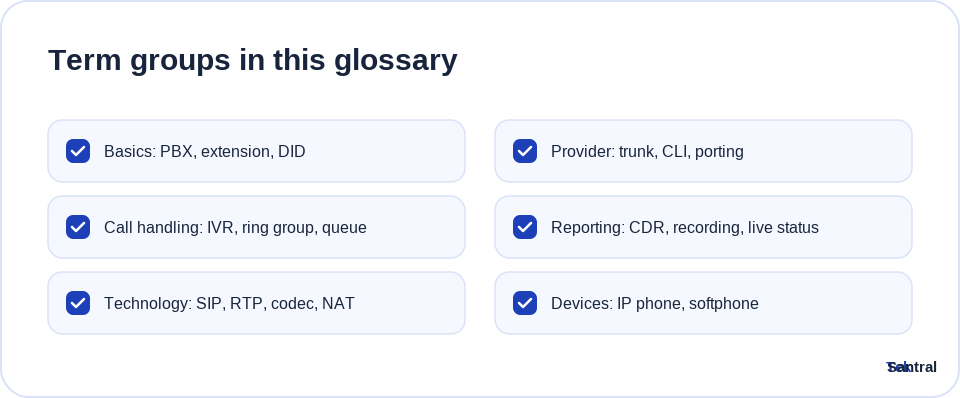
Terms are grouped into basics, call handling, technology, provider, reporting and devices. The diagram shows how a call moves through these terms.
Related pages: What Is a Cloud PBX? How It Works, Pricing
Basic PBX terms
The basics to know first.
PBX (private branch exchange)
The system that manages a business’s internal and external calls. It connects extensions to each other and to provider lines and routes calls by rules.
Cloud PBX
A PBX that runs as software on a data-centre server and is managed online. Also called a virtual or hosted PBX.
IP PBX
A PBX that carries voice over an IP network instead of analogue lines, on site or in the cloud.
Extension
A short internal number for a person or department, e.g. 101. Extensions call each other free.
DID (direct inward dialling)
A number callable from outside that is connected to the PBX. Each DID can route to a different menu, team or extension.
Business number
A fixed number allocated to a business, such as 0850, 444 or a city number.
0850 number
A ten-digit national number reachable nationwide, independent of cities.
444 number
A seven-digit short business number dialled without an area code.
Related pages: Business Numbers: 0850, 0212, 0216, 444Virtual PBX vs IP PBX vs Cloud PBX
Call handling terms
Terms describing how calls are greeted and distributed.
IVR (interactive voice response)
A voice menu that greets callers and routes them with key presses such as “1 for sales”.
Greeting
The first recorded message callers hear.
Ring group
Ringing several extensions together or in turn.
Call queue
A line where callers wait until the next agent is free.
Working hours
Rules sending calls to different targets by day and time, including holidays.
Message
A recorded message that then passes the call to another target.
Voicemail
A message left when nobody answers; it can be e-mailed as an audio file.
Hold music
Music played on hold or in a queue.
Call transfer
Passing a live call to another extension or number.
Call forwarding
Sending an extension’s calls elsewhere always, when busy or unanswered.
Call pickup
Answering a call ringing on another extension from your own phone.
Do not disturb
A setting that temporarily stops calls to an extension.
Related pages: How to Build an IVR Welcome Menu10 Ways to Reduce Missed Calls
Technology terms
Technical terms about connection and audio quality.
SIP
Session Initiation Protocol: the standard for starting, managing and ending calls over the internet.
RTP
The protocol that carries audio during a call; audio problems usually involve RTP.
VoIP
The general name for voice over the internet.
Codec
How audio is encoded; G.711 (alaw/ulaw) is common and high quality.
NAT
Local devices sharing one public IP; misconfiguration can cause one-way audio.
SIP ALG
A router feature that rewrites SIP messages; usually best turned off.
Registration
A device telling the PBX “I am here” with its username and password.
WebRTC
Technology letting a browser make calls without extra software; the browser phone uses it.
Related pages: What Is SIP? SIP Account vs SIP TrunkBrowser Phone, Mobile and IP Phones
Provider and number terms
Terms about provider lines, numbers and capacity.
SIP trunk
The line connecting the PBX to a provider for outside calls, by registration or IP authorisation.
IP authorisation
A provider accepting calls by the PBX’s IP address instead of a username.
CLI / caller ID
The number shown to the person you call; providers usually allow only numbers you own.
Concurrent calls
How many calls can run at once; a key capacity measure in cloud PBX plans.
Number porting
Keeping a number when changing provider; terms vary by operator.
STH
Fixed-line telephone service; the licensed operator service that allocates 0850, 444 and city numbers.
Related pages: What Is a SIP Trunk? Connect Your LineNumber Porting: Landline and 0850 Numbers
Reporting and device terms
Terms about tracking calls and the devices you talk on.
CDR (call detail record)
A record of each call’s time, duration, direction and who answered; call history is built from these.
Call recording
Recording a call’s audio; callers must be informed.
Live status
A real-time view of online extensions and active calls.
Missed call
A call nobody answered and no voicemail caught.
IP phone
A desk phone connecting to the PBX over SIP.
Softphone
A phone app on a computer or mobile.
Related pages: Choosing IP Phones and SoftphonesCall Recording and KVKK: A Business Guide
The terms in practice: a set-up example
Seeing the terms combine into a working PBX makes them easier to remember. Picture a twelve-person accounting and advisory office with an 0850 number and a city number, both connected to the cloud PBX over the provider’s SIP trunk. On the PBX each number is a DID routed to the same greeting menu.
The greeting gives the company name and a recording notice. The IVR offers “1 customer service, 2 accounts, 3 advisory”. Option one goes to a two-person ring group, option two to the accounts queue and option three to the adviser’s extension. With no key press, the call goes to reception.
The hours plan runs the menu weekdays 9 am to 6 pm, and a message plus voicemail at other times; voicemail arrives by e-mail. Staff extensions ring on desk phones and mobile apps together; calls are set up with SIP and audio flows over RTP in G.711 alaw. Each call is logged as a CDR and the manager tracks missed calls in the call history.
Related pages: How to Build an IVR Welcome Menu10 Ways to Reduce Missed Calls
Where will you meet each term?
Some terms appear in quotes and contracts, some in the PBX panel and some in correspondence with your provider. Knowing where each is used helps you ask the right person the right question.
| Where? | Frequent terms |
|---|---|
| Quotes and plan comparisons | Extensions, concurrent calls, number capacity, recording storage |
| PBX panel | IVR, ring group, queue, hours plan, announcement, voicemail |
| Provider correspondence | SIP trunk, IP authorisation, CLI, porting |
| Phone set-up | SIP server, registration, codec, NAT, SIP ALG |
| Reports | CDR, call history, missed call, live status |
Why does knowing the terms matter?
Knowing PBX terms does not make you a technician, but it makes good decisions easier. When a quote says “10 extensions, 5 concurrent calls” you know what it means for your team; when your provider says “IP authorisation” you know what to share; when a phone says “registration failed” you know where to look.
This glossary is updated regularly. If you meet a term in the panel or a quote that is not here, ask us through support requests in the customer panel.
How should you use this glossary?
Rather than memorising terms, keep this page open as a reference while setting up a PBX or comparing offers, and check the relevant group as needed.
Terms that are often confused
Some terms are used interchangeably but mean different things. The table compares the most confused pairs.
| Pair | Difference |
|---|---|
| Extension vs DID | An extension is an internal short number; a DID is a real number callable from outside. |
| Ring groups and queues | A ring group rings phones together; a queue holds callers in line. |
| Transfer vs forwarding | Transfer moves a live call; forwarding applies a rule before answering. |
| SIP account vs SIP trunk | A SIP account is an extension; a SIP trunk connects the PBX to a provider. |
| Announcement vs IVR | An announcement only plays a message; an IVR offers key choices. |