
What is SIP?
SIP (Session Initiation Protocol) is a standard protocol for starting, managing and ending voice and video calls over the internet. Cloud PBXs, IP phones, softphone apps and provider lines mostly talk to each other through SIP.
SIP is the “traffic police” of a call: it handles who is calling whom, whether the phone rings and when the call starts and ends. The audio itself usually flows on a separate channel called RTP. This split also explains why audio problems and connection problems show different symptoms.
Related pages: What Is a Cloud PBX? How It Works, Pricing
How does SIP work?
To work with SIP, a phone or app first “registers” with the PBX, sending its username and password to say “this extension is on this device now”. The PBX uses this to deliver calls to the right device. Registration renews at intervals; if the device is off or the internet drops, the registration lapses and the extension shows as “offline”.
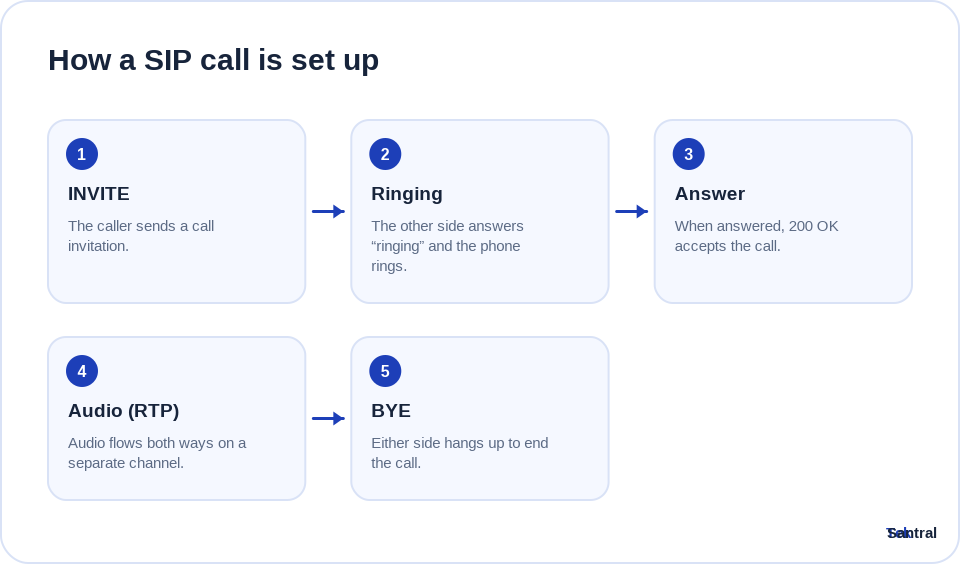
When a call starts, the caller sends an INVITE. The other side replies ringing, then answered. The two agree on an audio codec and voice starts flowing. At the end, a BYE message closes the session. Transfers, hold and keypad tones also run through SIP messages.
| Term | What it means |
|---|---|
| REGISTER | A device telling the PBX “I am here” |
| INVITE | A request to start a call |
| RTP | The protocol that carries audio |
| Codec | How audio is encoded, e.g. G.711, Opus |
| SIP ALG | A router feature that rewrites SIP and often causes trouble |
| NAT | Many local devices sharing one public IP |
What is the difference between a SIP account and a SIP trunk?
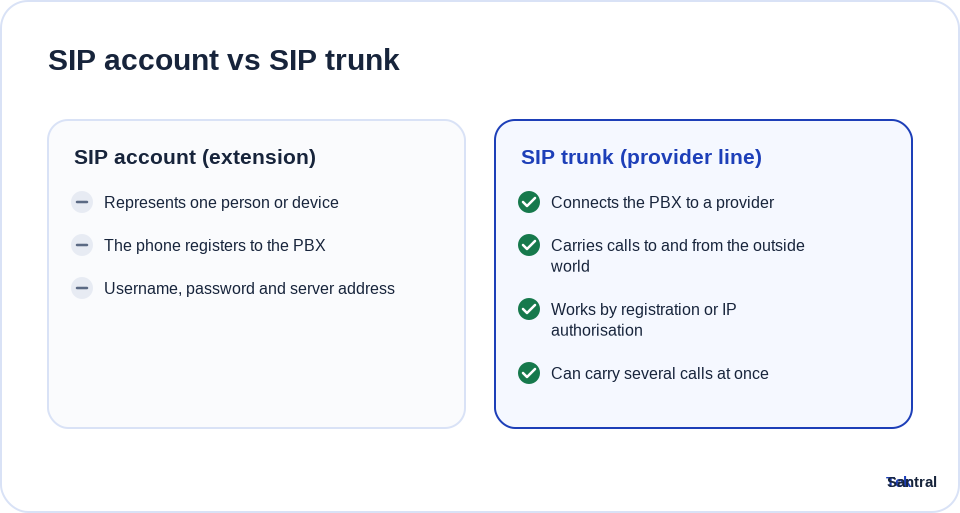
A SIP account represents an extension on the PBX. Your desk phone, computer app or mobile SIP app registers to the PBX with it. Every employee or department has one SIP account (extension).
A SIP trunk connects the PBX to a provider. Calls to your number and calls you make to the outside go through it. Providers offer trunks in two ways: “SIP account registration”, where the PBX registers with a username and password, or “IP authorisation”, where the provider routes the number to the PBX’s IP address.
Related pages: What Is a SIP Trunk? Connect Your LineCloud PBX Setup with a NetGSM SIP AccountConnecting a Verimor Number to a Cloud PBX
How do you connect a phone with SIP?
Three details connect a device to a cloud PBX: SIP server address, username and password. At TekSantral each extension’s page in the panel shows them. The username is the full value including your customer number and extension (e.g. t12-101); typing only the extension number makes registration fail.
- Add a new SIP account in the app or phone.
- Enter the server address shown in the panel and port 5060.
- Copy and paste the username and password from the panel.
- Once registered, dial *43 for an echo test.
- Sign the same extension in on other devices so calls ring on all of them.
Related pages: Choosing IP Phones and SoftphonesBrowser Phone, Mobile and IP Phones
Common SIP problems and fixes
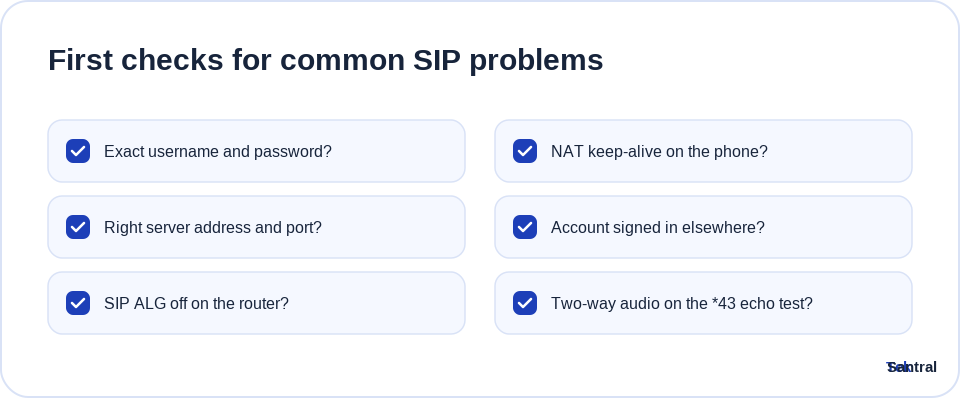
Most SIP problems come from network settings. “Phone offline” usually means a wrong username, password or server; “one-way audio” or “no audio” usually comes from SIP ALG on the router or NAT settings.
Calls dropping after about 30 seconds are also usually NAT-related: confirmation messages do not arrive because the device’s session is not kept alive. Turning on “NAT keep-alive” on the phone and SIP ALG off on the router fixes most of these.
Related pages: Support and Setup Guides
Why does the SIP codec matter?
When a SIP call starts, both sides agree on an audio codec. The codec decides how voice is compressed before travelling over the internet and affects both quality and bandwidth. In Turkey, the most common codec on provider lines is G.711 alaw, an uncompressed, high-quality codec.
If the two sides cannot agree on a codec, you may get “call connected but no audio”. Make sure the PBX and provider have matching codecs enabled. On the cloud PBX, alaw and ulaw are enabled by default for provider lines, and most IP phones and softphones support them.
| Codec | Feature | Typical use |
|---|---|---|
| G.711 alaw | Uncompressed, high quality; standard in Europe and Turkey | Provider lines, IP phones |
| G.711 ulaw | Same quality as alaw; North American standard | Fallback codec |
| G.722 | Wideband “HD voice” | Internal calls |
| Opus | Modern codec that adapts to bandwidth | Browsers and mobile apps |
Firewalls and ports for SIP connections
SIP uses two kinds of traffic: signalling that manages the call and media that carries audio. Signalling usually uses port 5060 and audio a range of UDP ports. If your office has a strict firewall, both must reach the PBX server and come back; otherwise the phone registers but there is no audio.
Most home and small-office routers need no extra setting; outgoing connections open automatically. Problems usually come from SIP ALG rewriting SIP messages or NAT sessions closing too early. In corporate networks, your IT team only needs to allow SIP and audio traffic to the PBX server address.
If your provider line uses IP authorisation, it works the other way: the provider’s IP addresses must be allowed on the PBX so it can send calls. At TekSantral, provider addresses customers enter activate after our team approves them for security; well-known providers such as Verimor and NetGSM have ready-made settings.
Related pages: What Is a SIP Trunk? Connect Your LineConnecting a Verimor Number to a Cloud PBX
What can you do with SIP?
SIP powers far more than phone calls. On a cloud PBX it brings different device brands, providers and locations together in one system.
Multiple devices
One extension rings on desk phone, computer and mobile.
Provider independence
Lines from different providers join the same PBX.
Transfer and hold
Calls are transferred and held between extensions.
Presence
Phones can show which extensions are busy.
How do you diagnose a SIP problem step by step?
Naming the symptom correctly is half the fix. First decide whether the problem is registration, call set-up or audio. If the extension shows “offline”, it is registration: check username, password and server. If it is online but calls fail, look at outbound permission, the provider line’s status or the dialled number’s format.
If the call connects but audio is missing or one-way, the network is the likely cause. The *43 echo test shows whether audio reaches the PBX and back, independent of the provider. If the echo works both ways, look at the provider; if not, look at the local network. This split makes support requests much faster to resolve.
- Offline: username, password, server address.
- Calls fail: outbound permission, trunk status, number format.
- No or one-way audio: SIP ALG, NAT keep-alive, *43 test.
Related pages: Support and Setup Guides
A short SIP checklist
Running through this list when connecting a device or fixing a problem usually solves things without a support request.
- The full username and password copied from the panel
- The right server address and port 5060
- SIP ALG off and NAT keep-alive on
Is SIP secure?
Because SIP accounts face the internet, password security is critical. Attackers may guess weak passwords to place costly international calls. Use long random passwords for each extension, close unused accounts and only open the outbound permissions you need.
At TekSantral extension passwords are generated randomly by the panel, international and premium-rate calls are off by default and every customer’s PBX is isolated from the others.