
What is a virtual PBX?
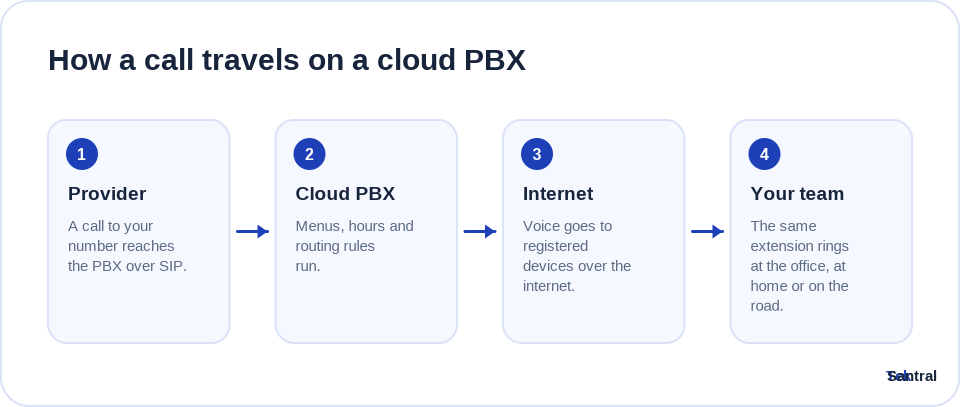
A virtual PBX is a business phone system that runs as software on a server instead of a physical box. In everyday use, “virtual PBX”, “cloud PBX” and “hosted PBX” usually describe the same service: the PBX runs in a data centre and you manage it through an online panel.
Extensions, IVR menus, business hours and call recordings live on the PBX server. Phones, computers or mobile apps connect to it over the internet, so you no longer need a PBX box, a wiring cabinet or service visits at the office.
Related pages: What Is a Cloud PBX? How It Works, Pricing
What is an IP PBX?
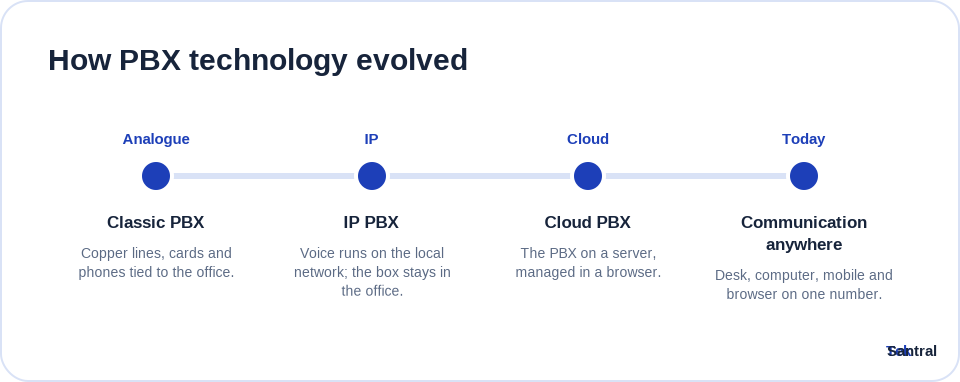
An IP PBX carries voice over an IP network instead of analogue lines. Phones connect by network cable or Wi-Fi, and calls use standard protocols such as SIP. An IP PBX can be a box in the office or run on a server.
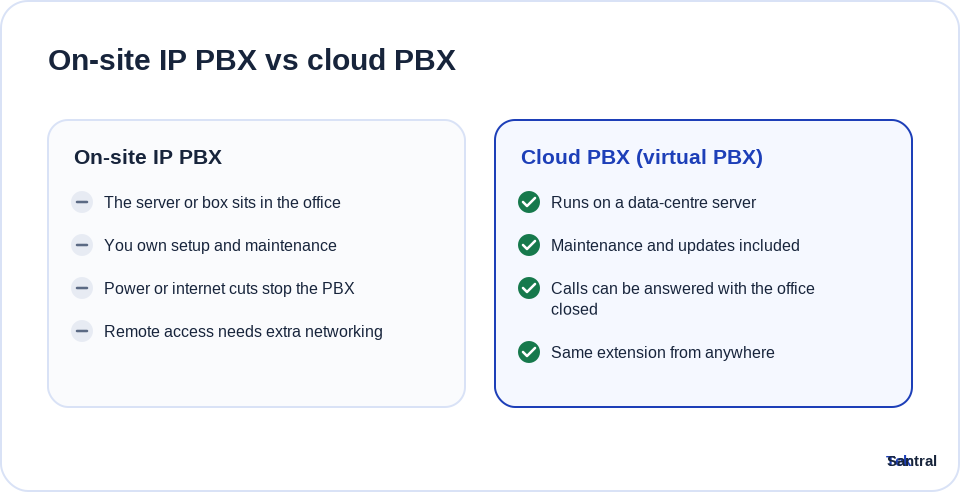
So every cloud PBX is an IP PBX; the difference is where it runs and who looks after it. With an on-site IP PBX, hardware, backups, security updates and internet access are your job. With a cloud PBX the provider takes these on and you only manage your call flow.
Differences between virtual, IP and classic PBX
Putting the three side by side makes it easier to see which suits your business. The table compares the most common criteria.
| Criterion | Classic (analogue) PBX | On-site IP PBX | Cloud / virtual PBX |
|---|---|---|---|
| Up-front cost | Unit, cards, cabling | Server or box, IP phones | None; monthly fee |
| Maintenance | Service centre | IT staff or service | Included |
| Remote work | Hard | With extra networking | Built in |
| Scaling up | New cards or units | Licences and hardware | Plan upgrade |
| An office move | Reinstallation | Move the box | Not affected |
| Administration | Technician | Admin interface | Browser panel |
Related pages: Cloud PBX Pricing: What Drives the Cost?
Which business should choose which PBX?
The main factors are where the team works, IT resources, growth and existing infrastructure. Large single-site organisations with their own IT staff and special integrations may prefer an on-site IP PBX. For most small and mid-sized businesses, a cloud PBX means less to manage and more predictable costs.
A cloud PBX fits better
If the team works in several places, branches open, there is no IT team or setup must be fast.
An on-site IP PBX may suit
If everyone is in one building, there is a strong IT team and the PBX should stay on the local network.
A classic PBX is due for replacement
If spare parts are getting scarce and remote work has become a need.
Related pages: Cloud PBX Migration Guide and ChecklistCloud PBX for Small BusinessesCloud PBX for Multi-Branch Businesses
Does your number change when you move to the cloud?
No. The cloud PBX changes how calls to your number are handled, not the number itself. Your number stays with your provider and connects to the PBX by SIP account registration or IP routing. If you have no number, TekSantral can allocate a new business number in your name from fixed-line operators as an authorised reseller.
You do not need to switch off the old system at once. Prepare extensions, the menu and hours on the cloud PBX first, add phones as a second account and test. When everything is ready, simply point the number at the new PBX.
Related pages: What Is a SIP Trunk? Connect Your LineNumber Porting: Landline and 0850 NumbersBusiness Numbers: 0850, 0212, 0216, 444
How are security and continuity handled on a virtual PBX?
Because a cloud PBX runs in a data centre, a power or internet cut at the office does not stop calls being handled: menus and voicemail keep working and calls can be answered on a mobile app. That is a real continuity advantage over a classic PBX tied to one box.
On security, strong passwords, disabling unused extensions and limiting outbound permissions matter. At TekSantral every customer’s PBX is isolated from others; international and premium-rate calls are off by default and only opened on request.
- Use the strong password the panel generates for each extension.
- Delete or reset the extension of anyone who leaves.
- Turn off outbound calling on extensions that do not need it.
- If you record calls, inform callers.
Related pages: Call Recording and KVKK: A Business Guide
How do you move to a cloud PBX step by step?
Moving from a classic or on-site IP PBX to the cloud can happen without customers noticing if done in the right order. The rule is to prepare the new system while the old one runs and switch the number last. If anything goes wrong, you can point the number back within minutes.
Start by documenting the current set-up: which extension belongs to whom, what plays when the number is called, what happens after hours and which calls are recorded. This list is the basis for the cloud set-up. Then create extensions, ring groups and the IVR in the panel, upload greetings and define business hours.
Adding phones to the new PBX as a second account eases the transition. Many IP phones and softphones support two accounts at once, so new extensions can be tested while the old PBX still runs. When ready, ask your provider to redirect the number or enter the SIP account details in the cloud PBX.
- List current extensions, call flow and recording needs.
- Build extensions, the menu and hours on the cloud PBX.
- Add phones as a second account and test.
- Point the number at the new PBX and make test calls.
- Watch call history for a week, then retire the old system.
Related pages: Cloud PBX Migration Guide and ChecklistNumber Porting: Landline and 0850 Numbers
Which features should a virtual PBX include as standard?
The biggest difference between virtual PBX services is often not price but what the plan includes. Having the everyday essentials without extra charges keeps total cost predictable.
At TekSantral, IVR menus, business hours and holiday plans, ring groups, queues, announcements, voicemail by e-mail, call recording, call history and live status come in every plan. One extension can ring on a desk phone, computer, mobile app and the browser phone in the customer panel; you also manage support requests and per-trunk minute tracking in the panel.
Call handling
IVR, business hours, ring groups and queues.
Recording and reporting
Call recording, call history and live status.
Flexible devices
Desk phone, softphone, mobile app and browser phone.
Self-service
Instant changes and support requests in a Turkish panel.
Related pages: Virtual PBX Features: The Complete ListCloud and Virtual PBX Pricing 2026: From TRY 440 a Month
Where does a virtual PBX make the biggest difference?
A virtual PBX’s clearest gift is freeing the phone system from the building. A new branch needs no cabling or PBX box; you create extensions for the staff and register their phones. When the office moves, the number and PBX settings stay the same and devices simply connect to the internet at the new address.
Flexibility also matters for seasonal businesses. Giving temporary staff extensions for a campaign and removing them afterwards takes minutes; a classic PBX might need extra cards, units or a service visit for the same thing.
Opening a branch
No cabling; create extensions and register phones.
An office move
Number and settings stay the same.
Temporary staff
Extensions are opened and closed in minutes.
Related pages: Cloud PBX for Multi-Branch Businesses
Questions to ask when choosing a virtual PBX
When comparing providers, focus on daily impact rather than jargon. These questions quickly show which service suits your business.
- Can I keep my number and provider?
- Are menus, hours, queues and recording included?
- Is there a Turkish panel where I can make changes myself?
- Can one extension ring on a desk phone, computer and mobile?
- How is support given and how are requests tracked?
Related pages: What Is a Cloud PBX? How It Works, PricingCloud and Virtual PBX Pricing 2026: From TRY 440 a Month