Cloud PBX for law firms: Clients are looked after, even during hearings.
A cloud PBX for law firms: route client and case calls to the right lawyer, get voicemail during hearings and manage recording preferences for confidentiality.
What is a cloud PBX for law firms?
A cloud PBX for law firms answers client, opposing-party and institution calls on the firm’s number, routes them to lawyers and assistants, and passes calls to an assistant or voicemail while a lawyer is in a hearing.
Lawyers spend much of the day in court, meetings or on the road. When the firm’s phone is not answered reliably, clients lose confidence from the first call. A cloud PBX makes sure every call has an owner.
Related pages: What Is a Cloud PBX? How It Works, Pricing
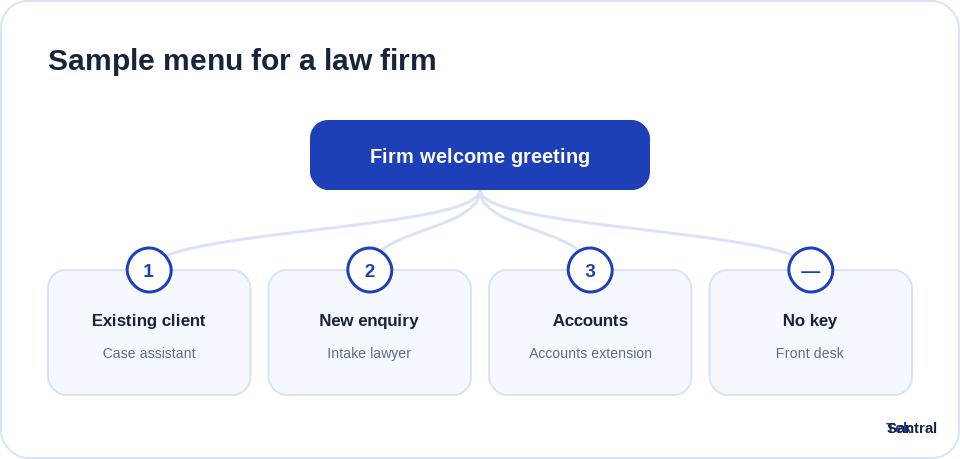
Sample call flow for a law firm
The firm’s greeting can split existing clients, new enquiries and other topics. Existing clients go to the case assistant, new enquiries to the lawyer or assistant who does first meetings. Without a key press, the call rings at the front desk.
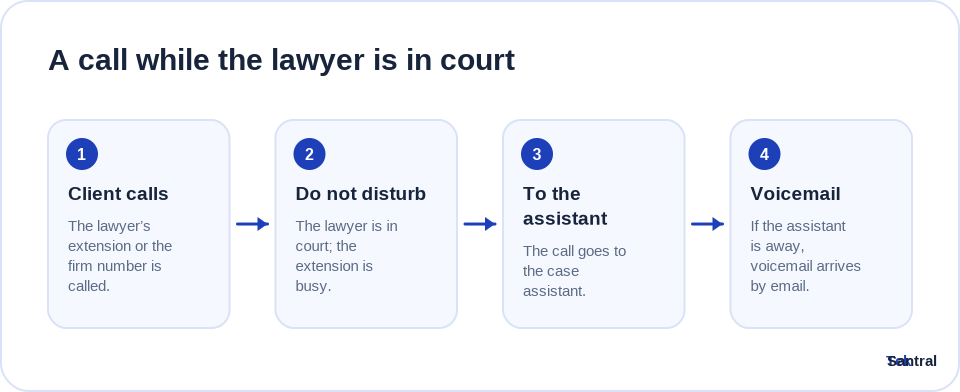
What happens to calls during a hearing?
When a lawyer turns on do-not-disturb or does not answer within a set time, the call goes to an assistant or the lawyer’s voicemail. The voicemail arrives as an audio file in the lawyer’s email, so after the hearing they see which client called.
Because the extension also rings in the mobile app, the lawyer can take calls in the courthouse corridor, and outbound calls show the firm’s number rather than a personal one.
Call recording and client confidentiality
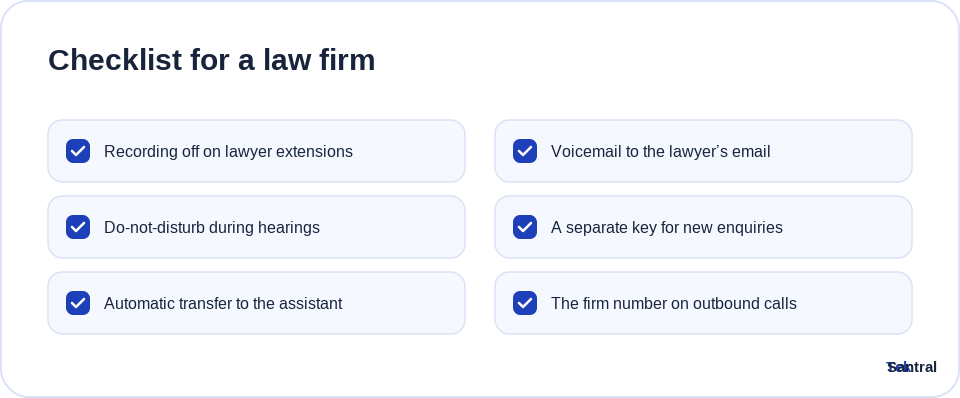
Conversations between lawyers and clients require confidentiality. Many firms therefore switch recording off entirely for lawyers’ extensions and record only the front desk or appointment line, if at all. In TekSantral recording is set separately for inbound, outbound and internal calls, and “never record” can be chosen per extension.
If you record, you must inform callers and keep access limited. We recommend you assess your professional duties and data protection obligations yourself.
Related pages: Call Recording and KVKK: A Business Guide
| Extension or line | Recording suggestion | Reason |
|---|---|---|
| Lawyer extensions | Never | Client confidentiality |
| Front desk | Optional, with notice | Confirming appointments and messages |
| New enquiry line | Usually off | First meetings may include sensitive details |
| Billing | Optional | Payment agreements |
Which features matter for law firms?
Law firms expect the PBX to lose no calls, give every call an owner when the lawyer is away and protect confidentiality.
Common mistakes at law firms
Firms often rely on lawyers’ personal mobiles, which weakens both client experience and confidentiality.
Giving clients personal mobiles
It creates expectations of access at all hours. Use the firm number and extensions.
Calls lost during hearings
Do-not-disturb and transfer to an assistant give every call an owner.
Unnecessary recording
Switching recording off on lawyers’ extensions protects confidentiality.
Sharing panel access
Limit access to call history and recordings to authorised people.
Which plan suits a law firm?
Starter suits firms with a few lawyers and one assistant. Partnerships and multi-office firms choose Business or Enterprise.
Every plan includes 250 MB and 7 days of call recording. Calling and number allocation fees are separate from the PBX plan; if you have no number, we allocate one in your name from licensed fixed-line operators as an authorised reseller.
Related pages: Cloud and Virtual PBX Pricing 2026: From TRY 440 a Month
| Plan | Price | Extensions / concurrent calls / numbers | Who it suits |
|---|---|---|---|
| Mini | TRY 489 | 5 / 1 / 1 | Sole-practitioner office |
| Starter | TRY 599 | 10 / 3 / 2 | Firms with a few lawyers |
| Business | TRY 789 | 25 / 10 / 5 | Partnerships with several assistants |
| Enterprise | TRY 1,199 | 50 / 15 / 10 | Multi-office law firms |
Must lawyers’ calls be recorded?+
No. Recording is optional and “never record” can be set for lawyers’ extensions.
What do clients hear during a hearing?+
The call goes to the assistant; if the assistant is away, the client leaves a voicemail that reaches the lawyer’s email.
Can lawyers take calls at the courthouse?+
Yes. The extension rings in the mobile app and outbound calls show the firm’s number.
Can new enquiries be handled separately?+
Yes. A separate menu key leads new enquiries to whoever does first meetings.
Who can access recordings?+
Recordings are played from call history in the customer panel; share panel access only with authorised people.
Is the firm’s number kept?+
Yes. Your number stays with your provider and is connected to the PBX.